Account Determination for Entry NCAN GBB BSA 7900 Not Possible -Fix & Solution
This error appears when SAP cannot find a G/L account configured for the combination of chart of accounts NCAN, transaction key GBB (offsetting entry for inventory posting), general modification BSA, and valuation class 7900. This guide covers the exact fix using OMWB, then goes deeper into what transaction key GBB actually does, why it needs a general modification key when other keys like BSX don't, a full reference table of common GBB modification codes, a real business scenario, and a full prevention checklist.
✅ Understand the Issue

No G/L account has been mapped in configuration for this specific chart of accounts, transaction key, general modification, and valuation class combination, so SAP cannot determine which offsetting account to post to.
🔧 Solution 1: OMDU -Confirm Valuation Area and Grouping Code
Select Valuation Area -1217, 1218; Company Code -1208; Chart of Accounts -NCAN; Valuation Grouping Code -0001.

🔧 Solution 2: OMWB -Configure the GBB-BSA Account Mapping
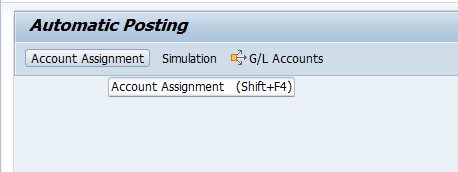
Go to OMWB and select Account Assignment.
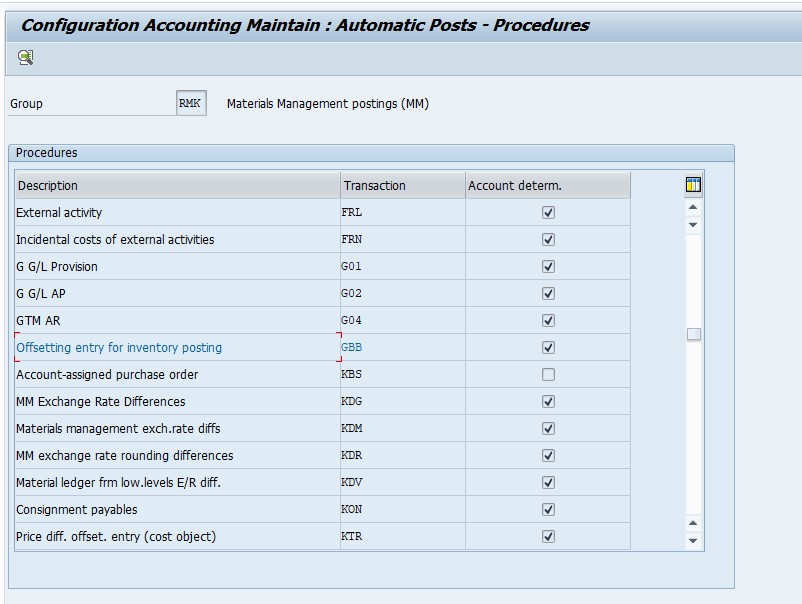
Select GBB -Offsetting Entry for Inventory Posting.
Select Chart of Accounts -NCAN.

Select Valuation Class -7900; Debit and Credit -500009; then configure the G/L accounts for general modification BSA.

Save.
🔍 What Transaction Key GBB Actually Does
GBB stands for the transaction/event key covering offsetting entries related to inventory posting. Where BSX (covered in a related guide on this site) determines the inventory account itself -the balance sheet side of a stock value change -GBB determines the other side of that posting: the expense, consumption, revenue, or clearing account that offsets the inventory movement.
GBB comes into play for scenarios like goods issue to a cost center (consuming inventory as an expense), initial entry of stock balances, scrapping, or physical inventory adjustments -essentially any movement where inventory value changes but there's no simple "stock moving from one location to another" logic that would keep the posting entirely on the balance sheet. Because these are genuinely different business scenarios that can all apply to the same material and valuation class, GBB alone isn't specific enough to determine a single G/L account -which is exactly why it needs the additional "general modification" key this error references (BSA in this case).
📋 General Modification: Why GBB Needs an Extra Layer
A general modification key (sometimes called an account grouping code) is a further sub-classification specifically used by transaction keys like GBB that cover multiple distinct business scenarios. Rather than mapping just "valuation class 7900 → one G/L account" for GBB, OBYC/OMWB maps "valuation class 7900 + general modification BSA → one G/L account," "valuation class 7900 + general modification VBR → a different G/L account," and so on, letting one valuation class correctly route to different offsetting accounts depending on exactly what kind of movement is happening.
| General Modification | Typical Scenario |
|---|---|
| BSA | Initial entry of stock balances (opening stock, movement type 561) |
| VBR | Goods issue to a cost center or internal consumption |
| VAX | Goods issue for a sales order without a corresponding cost object (typically for non-valuated sales order stock) |
| VAY | Goods issue for a sales order with an assigned account (cost object) |
| AUA | Order settlement (goods movement related to production/process order settlement) |
| AUF | Goods receipt for orders (without account assignment) and order settlement |
| INV | Physical inventory (stocktaking) variance postings |
| VNG | Scrapping of stock |
The error in this guide names BSA specifically, meaning the missing mapping relates to an initial stock entry scenario for valuation class 7900 -that's a strong clue pointing straight at exactly which OMWB row needs completing, rather than requiring a broader guess across all possible GBB scenarios.
📑 GBB vs BSX: Two Halves of the Same Posting
| Aspect | BSX | GBB |
|---|---|---|
| What it determines | The inventory (balance sheet) account for a stock value change | The offsetting account (expense, consumption, clearing) on the other side of the posting |
| Needs general modification? | No -valuation class alone is sufficient | Yes -one valuation class can map to several different GBB scenarios via general modification |
| Typical postings | Goods receipt, goods issue, transfer posting (the inventory side) | Consumption, initial stock entry, scrapping, order settlement (the offsetting side) |
Nearly every inventory-relevant posting in SAP touches both BSX and GBB at once -one determines where the value comes from on the balance sheet, the other determines where it goes (or comes from) on the other side of the entry. This is why a company completing OBYC configuration for a new valuation class needs to map both keys, not just one, before that valuation class is fully ready for live transactions.
✅ Prevention Checklist for MM/FI Configuration Teams
- Whenever a new valuation class is introduced, map it across every relevant transaction key -BSX, GBB (with all needed general modifications), PRD, and WRX -not just the one that happens to be tested first.
- Maintain a checklist of which GBB general modifications your business actually uses (BSA, VBR, VAX, VAY, AUA, INV, VNG) so new valuation classes are mapped completely from the start.
- Confirm the valuation grouping code assignment (OMDU/OMWD) is correct before troubleshooting OMWB mappings, since a mismatch there hides otherwise-correct configuration.
- Coordinate with finance on which G/L account is appropriate for each general modification scenario before entering it, rather than reusing an existing account by default.
- Test a full transaction cycle (initial stock entry, consumption, goods receipt, and any scrapping/adjustment scenarios your business uses) for any new valuation class in a sandbox before go-live.
📱 This Error in SAP S/4HANA
Transaction key GBB, general modification codes, and OMWB/OBYC configuration all work identically in SAP S/4HANA as in ECC, since this is foundational Materials Management/Financial Accounting integration configuration rather than something restructured by the Universal Journal. What changes in S/4HANA is visibility: because postings update the Universal Journal in real time, a missing GBB mapping is reported immediately at the moment of posting, and Fiori apps like "Manage G/L Account Master Data" or "Manage Journal Entries" can be used alongside OMWB to cross-check account existence while troubleshooting.
📑 Similar-Looking SAP Account Determination Errors
| Error | Transaction Key | What's Missing |
|---|---|---|
| Account determination for entry NCAN GBB BSA 7900 not possible | GBB | Offsetting account for the specific general modification (BSA) and valuation class |
| Account determination for entry ENER BSX not possible | BSX | Inventory account for the valuation class under this grouping code |
| Account determination entry 1003 GBB 0001 VAX 7920 | GBB | Offsetting account for general modification VAX (sales order goods issue without account assignment) |
| Account determination for entry 1003 BSX 0001_3050 not possible | BSX | Inventory account for a different valuation class/grouping code combination |
Recognizing the transaction key and general modification named in the message (as covered throughout this guide) immediately tells you which OMWB screen to go to, rather than treating every "account determination not possible" error as an identical, generic problem.
💼 Real-World Scenario: A New Valuation Class Missing Its GBB Mapping
Divya Gosh, an SAP MM/FI consultant, was engaged after a client's warehouse team hit this exact error while loading opening stock balances for materials under a newly introduced valuation class, 7900, as part of onboarding a new product category. The client's team had already correctly mapped valuation class 7900 for transaction key BSX (following the same process shown in this site's ENER BSX guide), so goods receipts and transfers were working fine -but the moment they tried an initial stock entry using movement type 561, they hit the NCAN GBB BSA 7900 error.
Divya explained that BSX and GBB are configured independently, and completing one doesn't automatically complete the other -the client's team had understandably assumed that having "set up account determination" for the new valuation class meant all the necessary mappings were done. She walked through OMWB with them, selecting transaction key GBB, chart of accounts NCAN, valuation class 7900, and general modification BSA specifically, and together they identified and entered the correct offsetting G/L account for opening stock entries. The initial stock load then posted successfully, and the team learned to check both BSX and GBB (at minimum) whenever introducing a new valuation class going forward.
❗ Common Mistakes When Fixing This Error
- Assuming that mapping a valuation class for BSX means GBB and other transaction keys are automatically covered too.
- Configuring only the specific general modification (like BSA) that triggered the error, without checking whether other GBB scenarios (VBR, VAX, AUA) will also be needed for that valuation class soon.
- Using the wrong debit/credit account pairing, which can post consumption to the wrong expense account even though the error itself disappears.
- Not confirming with finance which G/L account is actually appropriate for the specific general modification scenario before entering it.
- Forgetting to check OMDU's valuation grouping code assignment (Solution 1 in this guide) if the error persists even after OMWB configuration looks correct -a mismatched grouping code means OMWB entries won't be found at all.
📈 Troubleshooting Decision Tree
- Confirm the valuation grouping code assignment first (OMDU/OMWD) -a mismatch here means OMWB entries won't be found even if they exist.
- Identify the exact general modification named in the error (BSA, VBR, VAX, etc.) to know precisely which OMWB row needs mapping.
- Go to OMWB, select transaction key GBB, and check whether a mapping exists for this chart of accounts, valuation class, and general modification combination.
- Add the missing mapping, confirming the correct G/L account with finance before entering it.
- Check whether other GBB general modifications are also needed for this valuation class, to avoid repeating this troubleshooting for the next scenario.
📋 Related SAP Transactions
| Transaction | Purpose |
|---|---|
| OMWB | Configure automatic account determination with a guided, valuation-class-driven interface. |
| OBYC | Configure automatic account determination for all transaction keys directly. |
| OMWD | Assign valuation grouping codes to valuation areas (plants). |
| OMSK | Maintain valuation classes and their assignment to material types. |
| FS00 | Create or display a G/L account before assigning it in OMWB/OBYC. |
| MB1C | Post the initial stock entry (movement type 561) that typically triggers the BSA general modification. |
🎓 Interview-Style Questions and Answers
Q: Why does transaction key GBB need a general modification key when BSX doesn't?
Because GBB covers many distinct business scenarios (initial entry, consumption, scrapping, order settlement) that can all apply to the same valuation class, and each needs its own offsetting account; BSX only ever determines one thing -the inventory account -so valuation class alone is sufficient.
Q: If BSX is correctly mapped for a valuation class but GBB is not, what happens?
Goods receipts and transfers (which primarily rely on BSX) will work fine, but any posting requiring an offsetting entry under GBB -like an initial stock entry, consumption, or scrapping -will fail with an account determination error specific to the missing GBB/general modification combination.
Q: What does general modification BSA specifically represent?
BSA is the general modification used for the initial entry of stock balances, typically posted with movement type 561.
📚 Quick Glossary of Terms Used in This Guide
- GBB: The transaction/event key for offsetting entries related to inventory posting.
- General modification: A sub-classification used by transaction keys like GBB to differentiate between business scenarios needing different offsetting accounts.
- BSA: The general modification for initial entry of stock balances.
- OMWB: A guided SAP transaction for configuring automatic account determination, valuation-class-driven.
- Valuation grouping code: A grouping of valuation areas (plants) sharing identical account determination configuration.
🎯 Conclusion
"Account determination for entry NCAN GBB BSA 7900 not possible" is SAP correctly refusing to guess an offsetting account for a specific inventory scenario nobody has configured yet. By understanding that GBB requires a general modification key precisely because it covers many distinct business scenarios, and that completing BSX configuration for a valuation class doesn't automatically complete GBB too, you can resolve this error confidently in OMWB -and by checking which other GBB scenarios your new valuation class will need, you can get ahead of the next similar error before it interrupts a live transaction.