How to Assign Sales Group to Sales Office in SAP – OVXJ Tcode
In SAP, why use Sales Groups under Sales Offices? This step's main purpose is defining the sales structure, enabling accurate reporting and streamlined order processing. Each sales office can have multiple groups for better role distribution and responsibility tracking within the sales organization. This guide walks through transaction OVXJ, explains what this assignment actually enables once it's live, and covers what needs to already exist beforehand before the two can be linked together. If you run into any errors while following along, feel free to send a screenshot to pramod@learntosap.com for help.
✅ Why Assign a Sales Group to a Sales Office in SAP SD?
In SAP, why use Sales Groups to Sales Offices? This step is main purpose for defining the sales structure, enabling accurate reporting and streamlined order processing. Also, each sales office can have multiple groups for better role distribution and responsibility tracking within the sales organization.
Sales office already represents a regional branch or office - a Pune office, a Mumbai office, and so on. But a busy regional office is rarely one undifferentiated team; it usually has smaller desks or groups handling different customer segments, product lines, or key accounts. Sales group is what models that internal breakdown, and OVXJ is the step that formally links a given sales group to the sales office it belongs to.
Once assigned, both sales office and sales group values can default into the sales order header together, giving management two levels of granularity in reporting at once - regional performance by office, and team-level performance by group within that office - without any additional configuration or custom development required to separate the two.
📋 Where This Assignment Fits in the SD Organizational Structure
Sales group and sales office are two separate organizational elements, each defined independently before they can be linked. Seeing how OVXJ relates to the layers around it makes clear why this assignment is usually the very last piece of the sales office and sales group setup.
| Organizational Unit | Role | Typical Transaction |
|---|---|---|
| Sales Area | The combination of sales organization, distribution channel, and division used on sales documents. | OVXG |
| Sales Office | Represents a regional branch or office responsible for executing sales within a sales area. | OVX1 |
| Sales Office → Sales Area | Makes the sales office selectable on documents created for that sales area. | OVXM |
| Sales Group | Represents a team or desk within a sales office, defined independently. | OVXC |
| Sales Group → Sales Office | Links a sales group to the sales office it belongs to; created here. | OVXJ |
Because sales office needs to already exist, and sales group needs to already exist, OVXJ is genuinely the final link in the chain for team-level structure - there's nothing left to configure underneath it before a sales group becomes fully associated with its parent office.
🔧 SAP SD Configuration – Assign Sales Group to Sales Office (OVXJ) Explained
This is a short, purely relational transaction - both the sales group and the sales office already exist as separate configuration entries, and OVXJ simply links the two together.
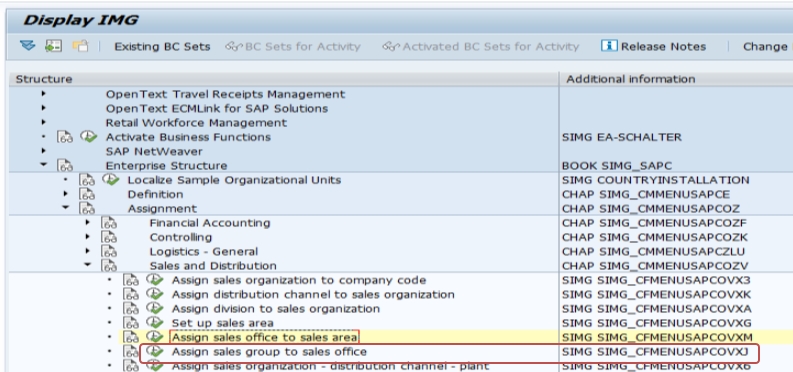
Run transaction OVXJ directly, or follow the IMG path: SPRO → Enterprise Structure → Assignment → Sales and Distribution → Assign Sales Group to Sales Office.
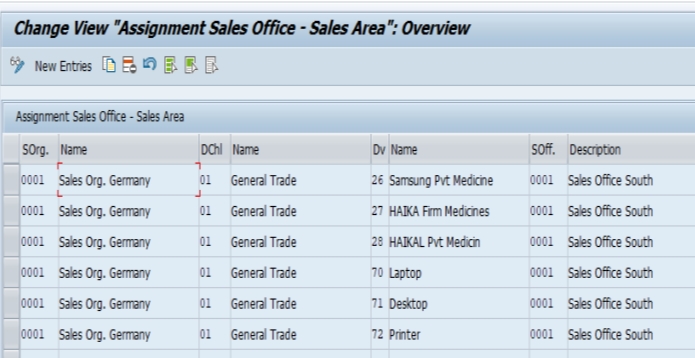
Click New Entries and assign the sales group to the relevant sales office, selecting the correct sales office code alongside the sales group being linked to it.
Select Save. The system will usually prompt for a transport request if the system is configured to require one, which is standard practice for enterprise structure changes so they can be tracked and migrated through the landscape (Development → Quality → Production) in a controlled way.
📋 What Needs to Already Exist Before Using OVXJ
Because OVXJ is purely an assignment step, it depends entirely on two pieces of configuration already being in place. Skipping ahead to OVXJ before either one is ready is one of the more common reasons this transaction produces confusing results for consultants working through the enterprise structure for the first time.
- The sales group must already be defined using transaction OVXC, including its code and description.
- The sales office must already be defined using transaction OVX1, and ideally already assigned to its relevant sales area using OVXM.
- A clear picture of the internal team structure the sales office actually needs, so each sales group created genuinely reflects a real desk or team rather than an arbitrary subdivision.
With both pieces confirmed, OVXJ becomes the short, final step that ties the team structure to its regional office - which is exactly why it is usually completed only after the sales office itself is already fully set up and usable.
💼 Real-World Scenario: Structuring Teams Within a Regional Office
Pooja Mishra, an SAP SD consultant at Learn Pharma in Pune, had already completed the sales office setup for the Pune branch, including its assignment to the correct sales area in OVXM. Sales manager Akshay Kumar explained that the Pune office actually ran two distinct teams internally - one handling large corporate accounts, and one handling smaller regional distributors - and he wanted monthly reporting to reflect that split rather than showing the whole office as a single lump figure.
Working with functional consultant Priya Patil, Pooja first confirmed that two sales groups had already been defined using OVXC - one for corporate accounts and one for distributor accounts. He then used OVXJ to assign both sales groups to the Pune sales office, formally linking each team to the branch they operated within. Business analyst Anita Patilasked whether this step alone was enough for order-entry users to start selecting the correct team on new orders, and Pooja confirmed it was, since the sales office itself was already correctly assigned to its sales area.
Within a day, order-entry users at the Pune branch could select the correct sales group alongside the sales office on new sales orders, and Suresh's monthly report broke out corporate and distributor performance separately for the first time - confirming that the OVXJ entries, quick as they were to configure, delivered exactly the team-level visibility the business had asked for.
❗ Common Mistakes When Assigning Sales Group to Sales Office
- Attempting the OVXJ assignment before the sales group has been defined in OVXC, or before the sales office has been set up in OVX1, resulting in an invalid combination.
- Creating sales groups that don't correspond to any genuine team or desk within the office, adding reporting complexity without a real business reason behind it.
- Assigning a sales group to the wrong sales office, which produces team-level reporting that's technically populated but doesn't reflect how the business actually operates.
- Assuming a sales office can only have one sales group assigned to it, when in fact multiple sales groups can - and often should - be linked to the same office.
- Confusing this assignment with the separate "Assign Sales Office to Sales Area" step, since both live in the same IMG assignment node under similar names and are easy to mix up.
- Making this assignment directly in a production client instead of testing it in a sandbox or development client first.
✅ Best Practices for This Assignment
- Confirm the business genuinely operates the team structure being modeled before creating and assigning sales groups, rather than subdividing an office just because the option exists.
- Complete the sales office's own sales area assignment (OVXM) before layering sales groups underneath it in OVXJ, so the whole structure works end to end.
- Document every sales group to sales office assignment in a configuration workbook so the mapping is auditable during testing and go-live.
- Test a sample sales order immediately after each OVXJ entry to confirm the sales group actually appears as selectable for that sales office.
- Coordinate sales group naming with the business so codes are meaningful and consistent, especially in offices with several teams operating side by side.
- Move enterprise structure changes like this through a transport request and test them in the Quality system before they reach Production, the same as any other configuration change.
📈 How This Assignment Supports Team-Level Reporting
Once a sales group is correctly assigned to a sales office, it becomes one of the more granular slicing fields available in SD sales reporting, sitting one level below sales office and letting management see performance by individual team or desk rather than only at the whole-office level. Standard SD reports, along with most custom or embedded analytics reports built on top of sales order and billing data, allow filtering and grouping by sales group (VKGRP) without any additional development, which is one of the strongest arguments for modeling genuine team structures with sales groups rather than tracking them manually outside the system.
Sales group also plays a role in partner determination in many implementations, similar to sales office - the system can be configured to propose a specific sales employee or team contact automatically based on the sales group selected on an order. Getting the OVXJ assignment right is therefore not purely a reporting concern; it can directly affect who gets proposed as responsible for a given customer interaction, which in turn affects commission tracking, escalation routing, and internal accountability for order fulfilment at the team level.
✅ Validating the Assignment Before Go-Live
Once the OVXJ entries are saved, it's worth running through a short validation checklist before considering the team structure genuinely ready for end users. Create a test sales order (VA01) against the sales office in question, and confirm the correct sales group appears and can be selected in the header organizational data. Save the order and confirm the value is stored correctly by displaying it (VA03) and checking the organizational data tab. Run a basic sales report filtered by sales group to confirm it's picked up correctly underneath the parent sales office. If the office has multiple sales groups assigned, repeat this check for each one individually, since a working assignment for one team says nothing about whether a second, separate group was set up correctly.
Skipping this validation step is one of the more common reasons team-level reporting looks incomplete after go-live - usually a missing OVXJ entry for one specific sales group, easy to overlook when an office has several teams rather than just one.
📱 This Configuration in SAP S/4HANA
Transaction OVXJ and the underlying concept of assigning a sales group to a sales office work the same way in SAP S/4HANA as in classic ECC, since this assignment remains a foundational SD organizational link unaffected by the Universal Journal or the simplified data model. The prerequisites - a defined sales group and a defined, sales-area-assigned sales office - and the sequence of steps leading up to OVXJ are also unchanged. What differs in S/4HANA is mainly on the analytics side: embedded analytics and Fiori reporting apps expose sales group as a standard dimension in many pre-built sales analytics apps in the Fiori launchpad, which means the payoff for completing every relevant OVXJ combination cleanly is larger than it was in classic ECC, since team-level performance dashboards can now be built almost entirely from standard content rather than custom ABAP reports.
📋 Sales Group vs Sales Office: Quick Comparison
Because both terms describe "who is responsible for a sale" at first glance, it helps to see them side by side once more, alongside the transaction that connects them.
| Aspect | Sales Office | Sales Group |
|---|---|---|
| Represents | A regional branch or physical office | A team or desk within that office |
| Defined in | OVX1 | OVXC |
| Table field | VKBUR | VKGRP |
| Requires assignment to | Sales Area (OVXM) | Sales Office (OVXJ) |
| Typical use | Regional performance reporting | Team-level performance and account ownership |
Seeing the two side by side makes the dependency clear: sales group depends on sales office, which in turn depends on sales area. Skipping a step anywhere in that chain leaves the layer above it looking correctly configured while the finer-grained reporting underneath quietly fails to work.
📋 Related SAP Transactions
| Transaction | Purpose |
|---|---|
| OVXJ | Assign sales group to sales office. |
| OVXC | Define sales groups. |
| OVX1 | Define and maintain sales offices. |
| OVXM | Assign sales office to sales area. |
| OVXG | Set up a sales area by combining sales organization, distribution channel, and division. |
| VA01 / VA03 | Create or display a sales order, including its sales group and sales office fields. |
🎓 Interview-Style Questions and Answers
Q: Why does a business bother creating sales groups if sales office already provides regional reporting?
Because sales office only reports at the branch level, while many businesses run several distinct teams within the same branch - sales group is what allows reporting and partner determination to work at that finer, team-level granularity.
Q: Can a sales office have more than one sales group assigned to it?
Yes, and this is the normal case for any office with more than one internal team - each sales group gets its own OVXJ entry linking it to the same parent sales office.
Q: What has to exist before an OVXJ entry can be created?
Both the sales group, defined in OVXC, and the sales office, defined in OVX1, must already exist before OVXJ can link them together. It's also good practice for the sales office to already be assigned to its sales area via OVXM.
Q: What is the practical symptom of a missing OVXJ entry?
The sales group will not appear as a selectable value alongside the sales office on the sales order header, even though the sales group itself exists correctly in the system when displayed on its own.
📚 Quick Glossary of Terms Used in This Guide
- Sales Group: An organizational element representing a team or desk operating within a sales office.
- Sales Office: An organizational element representing a specific geographical location, region, or branch office responsible for sales activities.
- VKGRP: The table field on the sales order (VBAK) that stores the selected sales group value.
- Role Distribution: The practical benefit of modeling teams as sales groups, allowing responsibility for customers or accounts to be tracked at the team level.
- Partner Determination: Configuration that can automatically propose a sales employee or team contact based on the sales group selected on an order.
- Transport Request: The mechanism used to move enterprise structure changes like this assignment through Development, Quality, and Production systems in a controlled way.
📝 Governance for Sales Group to Sales Office Assignments
Because a sales office can carry several sales groups, it's worth deciding early who is responsible for keeping the team structure current as the business reorganizes - new teams form, existing ones merge, or account responsibilities shift between groups. Most SD teams track this in the same configuration workbook used for the sales office setup itself, recording which sales groups are assigned to each office and what real-world team each one represents.
Governance matters here for the same reason it does throughout the enterprise structure: a sales group structure that no longer reflects how the business actually organizes its teams produces reporting that looks technically correct but is practically misleading. Reviewing this mapping periodically, particularly after any sales team reorganization, keeps the sales group assignments genuinely useful rather than a static snapshot of how the office was structured at go-live.
🎯 Conclusion
Assigning a sales group to a sales office in OVXJ is a short transaction on the surface, but it is the step that turns a regional office from a single reporting block into a set of genuinely trackable teams - exactly the kind of role distribution and responsibility tracking most sales organizations actually need. Confirming both the sales group and sales office already exist, covering every team the office genuinely operates, and validating the result with a test sales order are what separate a sales structure that looks correctly configured from one that actually delivers useful, team-level reporting. Keep this guide handy the next time your project needs to model a new team within an existing sales office, or restructure how an office's internal groups are organized.