SAP SD Return Order Process – How to Create Return Order in SAP (VA01)
A Return Order records goods that a customer sends back and starts the steps that follow: receiving the goods, updating stock and crediting the customer. This guide shows how to create a return order with transaction VA01, using reference order 20210, order type RE and the order reason Poor Quality from the original screenshots. It explains why customers return goods, how the return order differs from a credit memo request and a free of charge delivery, what happens after saving, common mistakes and troubleshooting. If you run into any errors while following along, feel free to send a screenshot to pramod@learntosap.com for help.
✅ Return Sales Order in SAP – Return Order (VA01)
How to Create Return Order in SAP: Step-by-Step Guide
Return Order in SAP SD is a crucial component of the overall sales and distribution process. It is essentially a document that allows you to manage and process customer returns efficiently. When customers need to return products for various reasons, such as defects, wrong items, or simply dissatisfaction, a Return Order is created to initiate the return process.
In simple words, a sale does not always end with a happy customer. Goods may arrive damaged, the wrong item may be sent, or the customer may change their mind. The return order is the document that records what is coming back, links it to the original sale and starts the steps that follow: receiving the goods, updating stock and giving the customer a credit. This guide shows how to create a return order with VA01 using the original screenshots, and then explains what happens next.
💡 Why Customers Return Goods
- Defects: The product does not work or is damaged.
- Wrong items: The customer received a different product or quantity than ordered.
- Dissatisfaction: The customer simply does not want the product.
- Poor quality: The product does not meet the agreed standard, which is the reason used in this guide.
- Transport damage: Goods were damaged on the way.
Recording the reason on every return order is valuable. Over time it shows which products and which suppliers cause the most returns, and it helps the company fix the cause instead of paying for the same problem again and again.
📋 SAP SD – Return Order, Free of Charge and Subsequent Delivery
Return orders sit in a family of sales documents that handle cases outside a normal sale. Besides the return order, many companies use a free of charge delivery, which sends goods to a customer without an invoice, and a subsequent delivery free of charge, which sends a replacement after a return or a complaint. The table lists them side by side.
| Document | Purpose | Typical Result |
|---|---|---|
| Return order | Customer sends goods back. | Goods are received and the customer is credited. |
| Free of charge delivery | Goods are given without a charge, for example a sample. | Delivery without an invoice. |
| Subsequent delivery free of charge | A replacement is sent after a complaint or return. | Replacement goods are delivered without an invoice. |
| Credit memo request | The customer is credited without goods returning. | Credit memo in billing. |
The exact order types and keys can differ between companies, so confirm them in your own system. This guide follows the return order, which uses the order type RE.
📋 Where the Return Order Fits in the Sales Process
The return order is a mirror image of the normal sale. The table shows the stages.
| Stage | What Happens | Document / Transaction |
|---|---|---|
| Original order | The customer buys the product. | VA01 |
| Return order | The return is recorded with reference to the order. | VA01 |
| Returns delivery | The goods arrive and are received into stock. | VL01N |
| Credit memo | The customer is credited. | VF01 |
Each document is linked to the one before it, so the whole history of the sale and its return can be read from the document flow.
📝 Return Order Transactions at a Glance
Go to Tcode VA01
| Transaction | Purpose |
|---|---|
| VA01 | Create the original order and the return order. |
| VA02 | Change the return order. |
| VA03 | Display the return order and its document flow. |
| VL01N | Create the returns delivery. |
| VF01 | Create the credit memo. |
| MMBE | Check stock after the goods are received. |
🔧 What You Need Before You Create a Return Order
- An original sales order, here order number 20210, which is the sale being returned.
- The order type RE and the right to use it.
- An order reason, here Poor Quality, defined in your system.
- Agreement with the customer on what will be returned and when.
- Warehouse readiness, so the returned goods can be received and inspected.
Without a reference and a reason, the return order is hard to approve and hard to analyze later.
🔧 Step-by-Step: Create a Return Order with VA01
Step 1: Create the Original Order
Go to Tcode VA01. Create order: 20210. This is the sales order that the customer later returns.
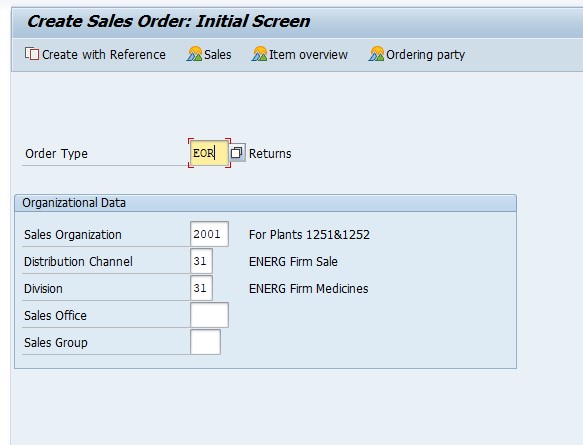
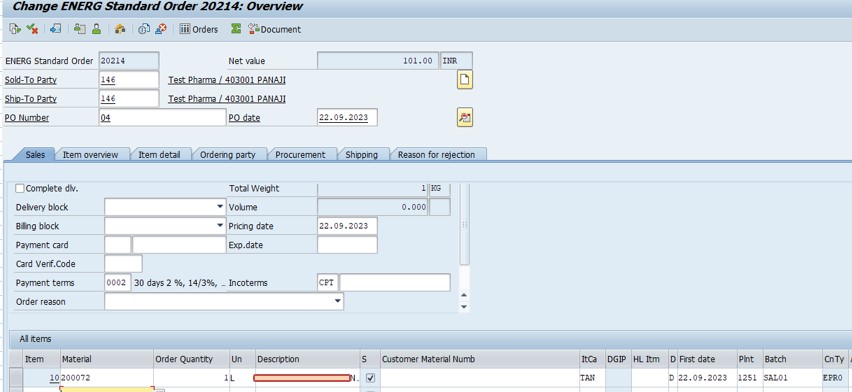
Step 2: Create the Return Order
Go to Tcode VA01. Select order: 20210.
Select the order type. Order Type: RE (Returns). Then select Copy.
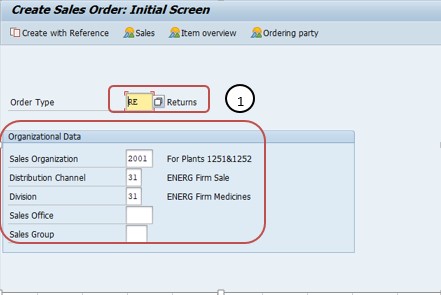
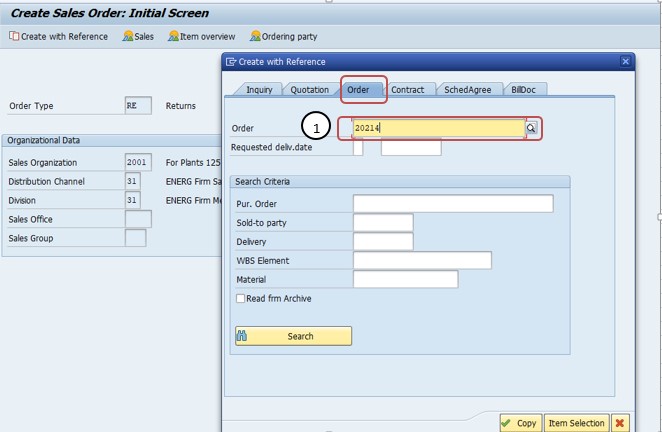
Select the order reason. Order Reason: Poor Quality.
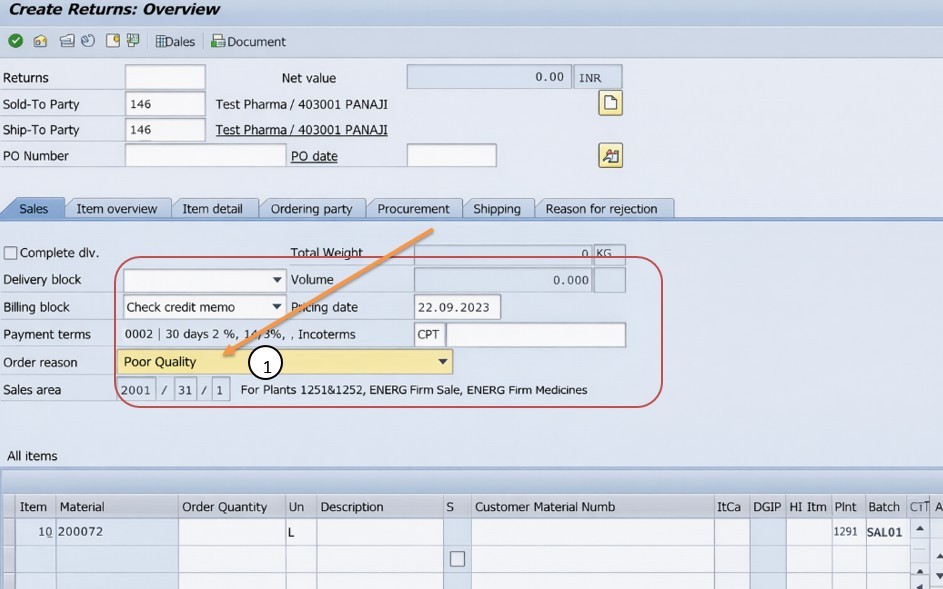
Save the return order. SAP shows a message with the number of the new return order.
📋 Values Used in This Tutorial at a Glance
The table below summarizes every value from the steps above, so you can compare it with your own screen before you save.
| Item | Value Used | Note |
|---|---|---|
| Transaction | VA01 | Create sales document |
| Original order | 20210 | The sale being returned |
| Order type | RE | Returns |
| Method | Copy | Copies items from the original order |
| Order reason | Poor Quality | Records why the goods return |
| Final action | Save | Creates the return order |
📝 Why the Order Reason Matters
The order reason is a small field with a big effect on reporting. When every return order carries a reason, the company can answer questions such as how many returns were caused by poor quality this quarter, which products return most often and whether the problem is getting better or worse. Without reasons, returns are only a cost, and nobody knows how to reduce them.
Agree a short, clear list of reasons with sales, quality and finance, and make the field mandatory in your process. Avoid a long list that nobody remembers, and avoid a vague reason such as Other. A good list of five to ten reasons is usually enough, and it can be reviewed once a year.
📦 What Happens After You Save the Return Order
Saving the return order does not move stock or money by itself. In a typical process, the next steps are these. First, the customer sends the goods back, and the warehouse creates a returns delivery with VL01N. Second, the goods are received, and the stock is updated, often into a blocked or inspection stock until the quality team has checked them. Third, finance creates the credit memo with VF01, and the customer account is credited.
Some companies set a delivery block or a billing block on return orders until the goods have been inspected. This protects the company from crediting a customer for goods that were never received or that are not defective. Check which blocks apply in your system, and make sure the team knows who releases them.
💼 Real-World Scenario: Returning Defective Goods at Learn Pharma, Pune
At Learn Pharma in Pune, a customer reported that part of order 20210 did not meet the agreed quality. Sales manager Rohan Kulkarni agreed to take the goods back.
Sales coordinator Pooja Patil opened VA01, selected order 20210 as the reference, chose the order type RE and selected Copy. She set the order reason Poor Quality and saved the return order. The warehouse team then created the returns delivery and received the goods into inspection stock.
After the quality team confirmed the defect, finance lead Sameer Joshi released the billing block and created the credit memo with VF01. Pooja recorded the steps in her work instruction, and the quality team used the order reason to track the problem.
📦 Receiving Returned Goods: Returns Delivery and Stock
When the goods arrive, the warehouse creates a returns delivery with reference to the return order. The delivery is the document on which the goods are counted, checked against the return order and booked back into stock. A careful goods receipt is the point where the company finds out whether the customer returned what the return order promised: the right items, the right quantity and the right condition.
Many companies book returned goods into a blocked or inspection stock first. The quality team checks them and decides whether they can be sold again, must be repaired or have to be scrapped. Only the goods that pass the check move into normal stock. This protects the company from reselling defective goods and keeps the stock value correct. Agree the stock types and the inspection routine with the warehouse and quality teams before using the process in production.
🔄 Refund, Replacement or Repair
| Option | When It Is Used | Typical Documents |
|---|---|---|
| Refund | The customer wants the money back. | Return order, returns delivery, credit memo. |
| Replacement | The customer wants the same product again. | Return order, returns delivery, subsequent delivery free of charge. |
| Repair | The product can be fixed and sent back. | Service or repair process linked to the return. |
| Goodwill credit | The customer keeps the product and gets a discount. | Credit memo request without goods returning. |
Agree the options with the customer at the start of the conversation. A clear choice prevents the common situation where the goods are returned, the refund is paid and the customer still expects a replacement.
📝 Return Policy and Authorization
A return order is easy to create, which is why many companies add rules around it. A return policy states within how many days goods can be returned, in which condition and with which proof. Sales staff use the policy to say yes or no consistently, and finance uses it to decide whether a credit is justified.
In SAP the rules can be supported by authorization and approval. Only trained users may create return orders, and large returns need a manager's release. A billing block can hold the credit until the goods have been inspected. When the policy, the authorization and the blocks work together, honest customers get fast service and the company is protected against abuse.
💰 Pricing, Credit and Tax on a Return
The return order copies the prices of the original order, so the customer is credited at the price originally charged. This is usually what the customer expects, even if the price list has changed since. If the return is only partial, the quantity in the return order should match the goods that actually come back, and the credit follows that quantity.
Taxes follow the original sale. If tax was charged on the invoice, the credit memo reverses the same tax on the returned amount, which keeps the tax accounts correct. Whenever a return crosses a period end or involves a special tax situation, confirm the treatment with your tax team. The exact accounting entries depend on your configuration and on local rules.
📞 Communicating with the Customer
A return is a stressful moment for a customer, so clear communication matters. Tell the customer the return order number, where and how to send the goods, and when to expect the credit. If the goods have to be inspected first, explain this at the start, so that the customer does not expect an immediate refund.
Keep the return order, the returns delivery and the credit memo together in the customer file. If the customer calls later, any team member can see the status in the document flow and give an honest answer. A smooth return often builds more loyalty than a flawless sale, because it shows that the company stands behind its products.
📝 Documentation and Month-End Review
Returns affect stock, revenue and customer accounts, so they should be reviewed at month end. Check that every return order has a reason and an approver, that every returns delivery has been received and that every credit memo matches a return order. Open return orders that have been waiting for a long time should be followed up, because they may hide lost goods or forgotten credits.
Keep screenshots of the key steps, such as the order type, the reference and the order reason, in your project documentation. A short monthly review, shared with sales, the warehouse and finance, keeps the process under control and gives auditors a clear trail of what was returned, why and what the customer received in return.
❗ Common Mistakes When Creating a Return Order
- Creating a return order without a reference, so the original data is not copied.
- Forgetting the order reason, so reports cannot show why goods return.
- Using a credit memo request when goods are actually coming back.
- Crediting the customer before the goods are received and inspected.
- Returning the wrong quantity or the wrong item.
- Not telling the warehouse, so returned goods arrive without a delivery.
🔧 Troubleshooting: When the Return Order Does Not Work
| Symptom | Likely Cause | What to Check |
|---|---|---|
| Original order not found. | Wrong order number or sales area. | Check the order in VA03. |
| Order type RE not available. | No authorization or the type is not set up for the sales area. | Check authorization and the order type configuration. |
| Order reason not offered. | The reason is not defined or not assigned. | Check the order reason configuration. |
| Returned quantity is too high. | The quantity exceeds what was delivered. | Check the delivered quantity in the original order. |
| Credit memo cannot be created. | A billing block is still set or goods are not received. | Check blocks and the status of the returns delivery. |
✅ Best Practices for Return Orders
- Always create the return order with reference to the original order.
- Make the order reason mandatory and keep the list short.
- Receive returned goods into inspection stock before crediting the customer.
- Set approval limits, so large returns need a manager's approval.
- Review returns by reason and by product every month.
- Tell the customer clearly how and where to send the goods.
📊 Using Return Data to Improve the Business
| Question | What It Tells You |
|---|---|
| Which products are returned most often? | Products with a quality or description problem. |
| Which reasons appear most? | Where to focus improvement, such as packing or supplier quality. |
| Which customers return the most? | Customers who may need training or different terms. |
| How long does a return take? | How fast the company handles customers and credits. |
Returns are costly, but they are also a source of honest feedback. A team that reviews the data every month can reduce returns, protect margin and keep customers happy.
📱 This Process in SAP S/4HANA
Return orders remain available in SAP S/4HANA, although screens and Fiori apps can differ from the classic examples used here. Confirm the exact steps in your own release before you train users. The business principle does not change: the return is recorded with reference to the original sale, the goods are received and the customer is credited.
🎓 Interview-Style Questions and Answers
Q: What is a return order?
A sales document that manages and processes customer returns.
Q: Which transaction and order type are used?
VA01 with order type RE.
Q: What does the order reason do?
It records why goods are returned, for example Poor Quality, and supports reporting.
Q: What follows the return order?
A returns delivery, goods receipt and a credit memo.
Q: How does it differ from a credit memo request?
A return order is used when goods come back. A credit memo request is used when only money is credited.
📚 Quick Glossary of Terms Used in This Guide
- Return Order: A sales document for goods that a customer sends back.
- Order Type RE: The standard key for returns.
- Order Reason: A code that records why the document was created.
- Returns Delivery: The delivery document that receives returned goods.
- Credit Memo: The billing document that credits the customer.
- Document Flow: The chain of documents linked to a sales order.
🎯 Conclusion
A return order gives your company a controlled way to take goods back and make things right for the customer. Open VA01, select order 20210, choose the order type RE, select Copy, set the order reason Poor Quality and save. Then receive the goods and credit the customer. If you run into any errors while following along, feel free to send a screenshot to pramod@learntosap.com for help.