🧩 What Are SAP Modules? The Complete List Explained
Today we are going to discuss the complete SAP modules list - what each module does, how they connect, and which one might be right for your career. SAP modules are distinct components or units of SAP software, each designed to address a specific business function or process within an organisation. Rather than building one giant, undifferentiated program, SAP organised its enterprise resource planning (ERP) system into focused modules - one for finance, one for sales, one for materials, one for production, and so on - all sitting on top of the same shared database. This is what makes SAP genuinely "integrated" rather than just a collection of separate tools: when a sales order is created in the SD module, it can automatically trigger a stock check in MM, post revenue recognition entries in FI, and update profitability data in CO, all without anyone re-typing the same information twice. In this comprehensive guide we cover every major SAP module - functional modules like FI, CO, MM, SD, PP, QM, HR/HCM, PM, and PS, logistics extensions like WM and EWM, and the technical modules ABAP, BASIS, and BW/BI - along with their core functions, the T-codes you will actually use, real business examples, and practical guidance on which module suits which kind of career.
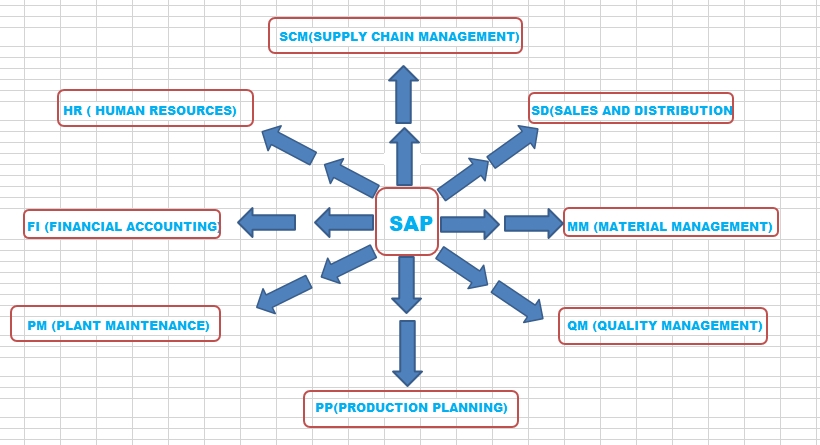
A simplified view of how the major SAP modules sit together inside the SAP ERP / S4HANA landscape.
One Database, Many Modules
Every SAP module reads and writes to the same underlying database, which is exactly what allows data to flow automatically between Sales, Materials, and Finance.
Functional vs Technical
Functional modules map to a business process (FI, MM, SD, HR). Technical modules run the system itself (ABAP, BASIS, BW) and support every functional module above them.
Pick One to Specialise
Most SAP careers begin by going deep into one or two modules rather than trying to learn all of them - this guide will help you see which module fits your background.
⚖️ Functional Modules vs Technical Modules - What Is the Real Difference?
Before listing every module individually, it helps to understand the one big dividing line in the SAP world: functional modules versus technical modules. Almost every SAP job description, training course, and certification path is organised around this split, so understanding it early will save you a lot of confusion later.
Functional Modules - Built Around Business Processes
A functional module exists to support one recognisable business activity - buying materials, selling products, paying invoices, managing employees, or planning production. Functional consultants are typically people who already understand that business area (an accountant moving into SAP FI, a warehouse manager moving into SAP MM) and who then learn how to configure SAP to match the company's real-world processes. They spend their time inside transaction screens, configuration tables (SPRO), and business process design rather than writing code.
Technical Modules - Built Around the System Itself
A technical module exists to build, run, and maintain the SAP system as a piece of software - regardless of which business process is running on top of it. ABAP developers write custom code and reports. BASIS administrators keep the system available, secure, and properly configured at the infrastructure level. BW/BI consultants build the data warehouse and reporting layer that pulls data out of the functional modules for analysis. Technical consultants typically come from a computer science or IT background rather than a specific business function.
| Attribute | Functional Modules (FI, MM, SD, HR...) | Technical Modules (ABAP, BASIS, BW) |
|---|---|---|
| What they manage | A specific business process - finance, sales, materials, HR, production | The SAP system itself - code, infrastructure, data warehousing |
| Typical background | Business/domain expertise (finance, supply chain, HR) | Computer science, IT, programming background |
| Main tool used | SPRO (configuration), business transactions (VA01, ME21N, FB50) | SE80/ADT (development), SU01/STMS (administration), BW modelling tools |
| Output of the work | Configured business processes that match the company's operations | Custom code, a stable running system, or analytical reports |
| Example role title | SAP MM Consultant, SAP FICO Consultant, SAP HR Consultant | SAP ABAP Developer, SAP BASIS Administrator, SAP BW Consultant |
Quick Tip: If you are deciding which path to pursue, ask yourself this: do you enjoy understanding how a business runs (sales, accounting, manufacturing) more than writing code? Choose a functional module. Do you enjoy programming, infrastructure, or data engineering more than business process design? Choose a technical module like ABAP, BASIS, or BW. Many successful consultants eventually become comfortable in both worlds, but almost everyone starts by going deep in one side first.
💰 SAP FI and CO - The Financial Backbone of SAP
FI and CO are so frequently implemented together that they are often referred to as a single combined skill set: SAP FICO. Even though they are technically two separate modules, understanding why they are paired will help you see how SAP's financial reporting actually works underneath the surface.
What it does: The Finance module is the financial backbone of SAP ERP. It covers everything from general ledger accounting to accounts payable and accounts receivable, asset accounting, bank accounting, and the statutory financial reporting a company must submit to tax authorities and regulators.
Real-world example: When a vendor invoice arrives, FI records the liability in accounts payable; when the company pays it, FI clears that liability and updates the bank/cash position - all of which eventually rolls up into the balance sheet and profit & loss statement.
Key T-Codes: FB50, FB60, F-28, FBL1N, FBL5N, FS00What it does: While FI focuses on external, legally required financial statements, CO focuses on internal management reporting - cost centre accounting, profit centre accounting, internal orders, product costing, and profitability analysis (CO-PA) used by management to make decisions.
Real-world example: A factory's electricity bill is posted once in FI as an expense, but CO allocates that same cost across multiple cost centres (Production, Quality, Maintenance) so managers can see exactly how much each department actually consumed.
Key T-Codes: KS01, KSB1, KO01, CJ20N, CO03Why FI and CO Are Studied Together: FI captures every financial transaction from a legal/statutory perspective, while CO redistributes and re-analyses that same financial data internally for management decision-making. Since they share so much underlying data, most training programs and most consultants treat SAP FICO as one combined specialisation rather than two separate, unrelated skills.
📦 SAP MM, SD, and SCM - Buying, Selling, and Moving Goods
If FI/CO is the financial backbone, MM and SD are the operational backbone - they manage the physical and transactional flow of goods into and out of a company. Together with the broader supply chain management capabilities of SAP, they cover the entire "buy it, store it, sell it, ship it" lifecycle.
What it does: The MM module handles procurement and inventory management. It streamlines the procurement process from purchase requisition through purchase order and goods receipt, manages material costs and valuation, and ensures optimal inventory levels across plants and storage locations.
Real-world example: A production planner raises a purchase requisition for raw steel; MM converts it into a purchase order sent to the vendor, records the goods receipt when the steel arrives at the warehouse, and updates the stock and valuation automatically.
Key T-Codes: ME21N, ME51N, MIGO, MIRO, MM01, MMBEWhat it does: For businesses focused on sales, the SD module is indispensable. It manages the entire sales process, from inquiry and quotation through order creation, delivery, and billing. Features like order tracking, pricing determination, and credit management improve sales efficiency and customer satisfaction.
Real-world example: A customer places an order; SD checks credit limits and available stock, creates the delivery once goods are picked and packed, and generates the billing document that flows straight into FI as revenue.
Key T-Codes: VA01, VA02, VL01N, VF01, VK11What it does: The SCM capability optimises the broader supply chain by integrating logistics, inventory management, demand planning, and procurement across multiple sites. It ensures a synchronised flow of goods and services, minimises cost, and improves visibility across the entire chain.
Real-world example: SCM-driven demand planning forecasts next quarter's sales, which automatically influences production scheduling in PP and procurement quantities in MM, keeping every part of the chain aligned to actual expected demand.
Related Components: APO, IBP, EWMWhat it does: Classic SAP WM (and its modern successor, Extended Warehouse Management, EWM) manages the physical movement of goods inside a warehouse - bin-level storage, picking strategies, packing, and put-away - going one level deeper than the storage-location-level tracking in standard MM.
Real-world example: When MM records a goods receipt, WM/EWM determines exactly which warehouse bin the pallet should be stored in, and later generates an optimised picking route when that stock needs to be retrieved for an outbound delivery.
Key T-Codes: LT01, LT03, /SCWM/PRDI🏗️ SAP PP and QM - Manufacturing and Quality Control
For any company that actually manufactures a physical product, PP and QM form the manufacturing core of the SAP system, sitting between procurement (handled by MM) and sales (handled by SD).
What it does: For manufacturing enterprises, the PP module is a key player. It manages the bill of materials (BOM), routing, and work centres, then assists in production planning, scheduling, and order execution. By optimising resources and production processes, PP enhances overall efficiency and helps ensure timely delivery of finished products.
Real-world example: MRP (Material Requirements Planning) in PP looks at sales forecasts and current stock, then automatically proposes production orders and purchase requisitions so that the right components arrive in time for the production line.
Key T-Codes: CO01, MD01, CS01, CR01What it does: Quality is non-negotiable in today's competitive landscape. The QM module integrates quality planning, inspection, and control directly into procurement, production, and sales processes, helping organisations maintain consistent product and service standards and meet regulatory or customer compliance requirements.
Real-world example: When a batch of raw material is received via MM, QM can automatically trigger an inspection lot; only once the batch passes inspection is the stock released from "quality inspection" status into "unrestricted use" stock available for production.
Key T-Codes: QA32, QM01, QE51NA Note on Module Interconnection: PP and QM rarely operate in isolation. A real production order in PP typically interacts with MM (for component consumption), QM (for quality inspection), and eventually FI/CO (for product costing), which is a good illustration of why SAP modules are best understood as one connected system rather than nine separate programs.
👥 SAP HR/HCM, PM, and PS - People, Plant Maintenance, and Projects
Beyond finance and the buy-make-sell cycle, three more widely implemented modules round out a typical SAP landscape: Human Resources, Plant Maintenance, and Project Systems.
HR / HCM - Human Capital Management
SAP's HR module (now more commonly branded HCM, Human Capital Management, and increasingly delivered via SAP SuccessFactors in the cloud) manages the entire employee lifecycle. From recruitment and onboarding to payroll, time management, benefits administration, and performance evaluation, this module is a comprehensive solution for workforce management. It not only automates routine HR processes but also helps align employee skills and development with broader organisational goals. Real-world example: When an employee is hired, HR creates their master record across linked infotypes (personal data, organisational assignment, bank details), which then feeds directly into the monthly payroll run without any duplicate data entry.
PM - Plant Maintenance
The PM module manages the maintenance of a company's physical equipment and assets - machinery, vehicles, buildings, and production lines. It covers preventive maintenance scheduling, breakdown maintenance, and the full work order lifecycle for repairs. Real-world example: A factory schedules preventive maintenance on a production machine every 90 days; PM automatically generates a maintenance order in advance, reserves the necessary spare parts in MM, and records the technician's labour hours once the work is complete.
PS - Project Systems
The PS module manages complex, often long-running projects - construction builds, capital investment projects, or large customer engagements - using a Work Breakdown Structure (WBS) and network activities to plan, budget, and track project costs against actual spend. Real-world example: A company building a new warehouse creates a WBS in PS with separate elements for design, permits, and construction; costs from MM purchase orders and FI invoices are settled directly against the relevant WBS element, giving real-time visibility into whether the project is on budget.
🖥️ SAP ABAP, BASIS, and BW - The Technical Modules That Keep SAP Running
None of the functional modules above would run without a technical layer underneath them. These three technical modules are where developers, system administrators, and data engineers operate.
What it does: ABAP is SAP's proprietary programming language and the module/skill area used to build custom reports, enhancements, interfaces, and entirely new programs whenever standard SAP functionality does not fully cover a company's requirement.
Real-world example: If a company needs a highly specific custom invoice layout that standard SD billing cannot produce, an ABAP developer writes a custom Smart Form or Adobe Form program, often triggered through a user exit or BAdI in the standard billing process.
Key T-Codes: SE80, SE38, SE11, ADT (Eclipse)What it does: BASIS administrators keep the SAP system itself healthy - user administration, transport management between development/QA/production, background job scheduling, system performance monitoring, and upgrades. Without BASIS, none of the functional modules would have a system to run on.
Real-world example: When a developer finishes building a new report, a BASIS administrator manages the transport request that moves that change safely from the development system through testing and finally into the live production system.
Key T-Codes: SU01, SE09/SE10, SM37, ST22What it does: SAP BW (Business Warehouse) extracts, transforms, and consolidates data from operational modules like FI, SD, and MM into a dedicated data warehouse optimised for large-scale reporting and analytics, without putting reporting load on the live transactional system.
Real-world example: A finance director wants a five-year trend report combining sales revenue from SD, cost data from CO, and headcount data from HR; rather than querying three live transactional systems directly, BW pre-aggregates this data into reusable reporting models.
Related Tools: BW/4HANA, SAP Analytics CloudWhat it does: SAP Security (often paired with Governance, Risk and Compliance, GRC) manages who can do what inside the system - building authorization roles, preventing segregation-of-duties conflicts, and supporting audits. It sits alongside BASIS but is increasingly treated as its own specialisation.
Real-world example: Before granting a new finance user access to post journal entries, a security consultant builds a PFCG role scoped to exactly the company codes and transactions that user needs - no more, no less.
Key T-Codes: PFCG, SU01, SUIM, STAUTHTRACE📋 Complete SAP Modules List - At a Glance
Use this consolidated table as a fast reference whenever you need to recall what a specific SAP module covers, without re-reading the full descriptions above.
| Module | Full Name | Category | Core Purpose |
|---|---|---|---|
| FI | Financial Accounting | Functional | External financial reporting, GL, AP/AR, asset accounting |
| CO | Controlling | Functional | Internal management reporting, cost & profitability analysis |
| MM | Materials Management | Functional | Procurement, inventory management, material valuation |
| SD | Sales and Distribution | Functional | Order-to-cash: quotations, orders, delivery, billing |
| PP | Production Planning | Functional | BOM, routing, MRP, production order execution |
| QM | Quality Management | Functional | Inspection planning, quality control, compliance |
| HR / HCM | Human Capital Management | Functional | Recruitment, payroll, time management, performance |
| PM | Plant Maintenance | Functional | Equipment maintenance planning and work orders |
| PS | Project Systems | Functional | WBS-based project planning, budgeting, cost control |
| WM / EWM | Warehouse / Extended Warehouse Management | Functional | Bin-level warehouse operations, picking, packing |
| SCM | Supply Chain Management | Functional | Demand planning and end-to-end logistics integration |
| ABAP | Advanced Business Application Programming | Technical | Custom development, reports, enhancements |
| BASIS | System Administration | Technical | User admin, transports, jobs, performance monitoring |
| BW / BI | Business Warehouse / Business Intelligence | Technical | Data warehousing and enterprise reporting/analytics |
| Security / GRC | Governance, Risk and Compliance | Technical | Authorization roles, SoD, audit and access control |
🔗 How SAP Modules Actually Connect to Each Other
The single most important thing to understand about SAP modules is that they are not isolated silos - they are deeply integrated, and that integration is precisely what makes SAP valuable to large organisations. Below is a real, end-to-end example showing exactly how a single business event ripples across multiple modules automatically.
Example: One Customer Order, Five Modules. A customer places a sales order (SD). SD checks the customer's credit limit and available stock. If stock is insufficient, an MRP run in PP may trigger a production order, which itself reserves raw materials in MM. Once produced, QM may inspect the finished goods before they are released to stock. SD then creates the delivery and billing document, which automatically posts revenue and cost-of-goods-sold entries into FI, and those same figures are simultaneously reflected in profitability analysis inside CO. One customer order, five connected modules, zero duplicate data entry.
Why This Matters for Your Career: Even if you specialise deeply in just one module - say, SAP MM - understanding how your module hands data off to its neighbours (MM to FI via account determination, MM to PP via component reservations) is what separates a consultant who can configure a screen from one who can actually design and troubleshoot a real business process.
🎯 Which SAP Module Should You Learn First?
With so many modules available, beginners often ask the same question: "which one should I actually start with?" There is no single universally correct answer, but your existing background is usually the best guide.
❓ SAP Modules - Frequently Asked Questions
SAP modules are distinct components within the SAP ERP system, each built to manage a specific business function such as finance, sales, materials, production, or human resources. Every module shares the same underlying database, so data entered in one module - like a sales order in SD - flows automatically into related modules like MM and FI.
Functional modules such as FI, CO, MM, SD, PP, and HR map directly to a business process and are configured by functional consultants who understand that business area. Technical modules such as ABAP, BASIS, and BW deal with the underlying system itself - programming, system administration, and data warehousing - and are handled by technical consultants and developers.
SAP MM (Materials Management) and SAP SD (Sales and Distribution) are commonly recommended starting points for functional beginners because they map closely to familiar business processes - buying and selling - and have strong entry-level job demand. Candidates with an accounting background often start with SAP FICO instead.
SAP does not have one official fixed number, since the count depends on how sub-modules and add-on solutions are categorised, but a typical SAP ERP/S4HANA implementation draws on around 15-20 core functional and technical modules, with FI, CO, MM, SD, PP, QM, HR, PM, PS, and WM/EWM forming the most widely implemented set.
Yes, though it is more common to specialise deeply in one or two related modules first - such as FI and CO together, or MM and SD together - before later broadening into additional areas. Cross-module fluency becomes especially valuable for senior consultants, solution architects, and project managers who need to see how the whole business process connects.
Largely yes - the same core functional areas (FI, CO, MM, SD, PP, QM, HR, PM, PS) still exist conceptually in S/4HANA, though SAP has simplified some underlying data structures (such as merging several finance tables into the Universal Journal, table ACDOCA) and increasingly delivers HR functionality through SAP SuccessFactors and warehouse functionality through SAP EWM rather than the older standalone modules.
SAP FICO is the common name for the combined Financial Accounting (FI) and Controlling (CO) skill set. They are treated together because FI captures financial transactions for external/statutory reporting while CO reuses much of that same data for internal management reporting, making them tightly linked in both configuration and day-to-day consulting work.
No, ABAP is not required to become a functional consultant in modules like FI, MM, SD, or HR, since functional work is primarily configuration-based rather than coding-based. That said, a basic working understanding of ABAP debugging is a useful complementary skill that helps functional consultants communicate more effectively with developers when custom enhancements are needed.
📘 Related SAP Tutorials
What Is SAP? Definition and Meaning
The full definition, meaning, full form and history of SAP - from 1972 to SAP S/4HANA.
Read TutorialSAP All Tables List Explained
Complete functional table reference covering MM, SD, FI, CO, HR, PP, WM, PM, and PS modules.
Read TutorialSAP Basis Tables List Explained
Every key Basis table covering users, transports, background jobs, spool, and system monitoring.
Read Tutorial