SAP SD Error: "Acct Group Sold-to Party 0001 Uses Ext. No. Assignment. Specify an Account Number" – Step-by-Step Fix
A user creates a customer with the account group Sold-to party and SAP stops because the account group uses external number assignment and no number was given. This guide explains the message, internal and external number assignment, the exact FBN1, XD01 and FS00 steps with the original screenshots, the reconciliation account, how to verify the result and how to avoid the error in future. If you run into any errors while following along, feel free to send a screenshot to pramod@learntosap.com for help.
❌ The Error Message at a Glance
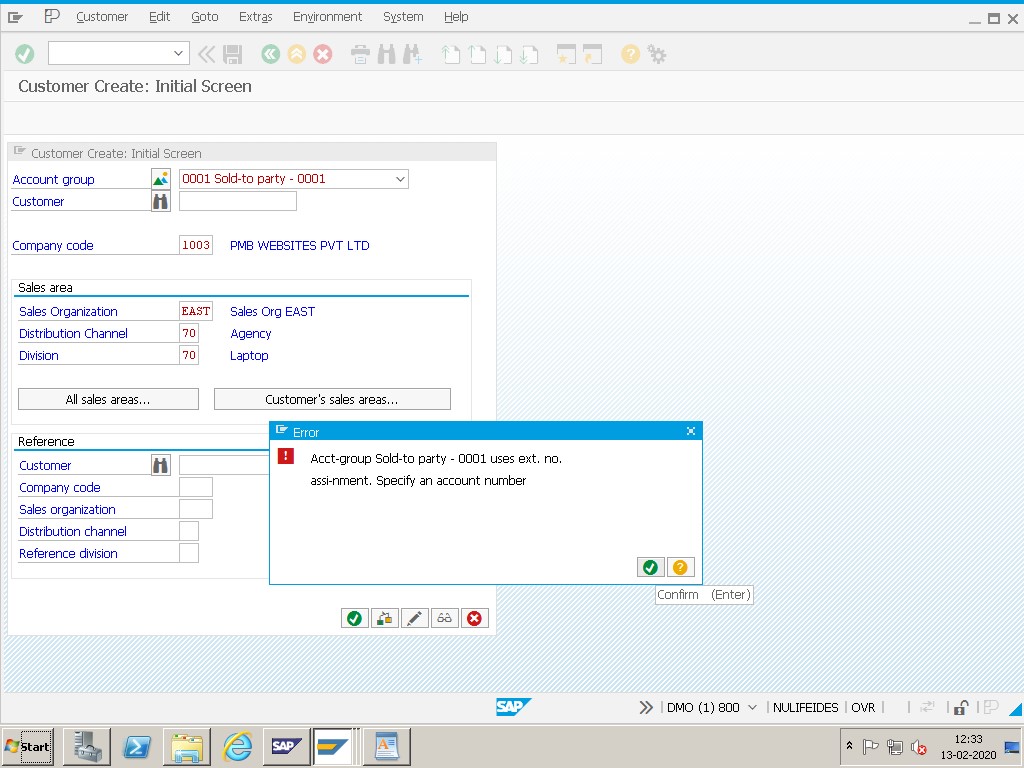
| Item | Value in This Example |
|---|---|
| Message text | Acct group Sold-to party-0001 uses ext. no. assignment. Specify an account number |
| Account group | 0001 (Sold-to party) |
| Number assignment | External |
| Module | SAP SD (customer master) with FI |
| Where to fix it | FBN1 as in the original, then XD01 and FS00 |
| Result | Customer can be created with a valid account number |
The account group and the numbers in your own message may differ from this example. The same method applies with your own values.
📑 What You Will Learn in This Guide
- What the message means
- Internal and external number assignment
- Why the error appears
- Where you meet the error
- Diagnose the problem
- Solution: remove the external mark and create the customer
- Two ways to solve the error
- The reconciliation account
- Values used in this guide
- Notes before you save
- Verify the fix
- Real-world scenario
- Common mistakes
- Troubleshooting
- Prevent the error
- Frequently asked questions
✅ SAP Error Fix: Sold-to Party 0001 – Specify Account Number
This message appears when you try to create a customer with the account group Sold-to party (0001), but the system has no customer number to use. The account group is set up for external number assignment, which means SAP does not generate the number by itself. You must specify an account number, and the number has to fall inside the interval that was defined for that account group.
In simple words, the account group says "the user will choose the number", and the user left the number field empty. The message is therefore not a system fault. It is a reminder, and it is solved either by entering a valid number or by changing how the number range works. This guide follows the steps of the original tutorial and then explains the background, so you understand which option fits your company.
📝 Internal and External Number Assignment Explained
Every customer account group has a number range that controls how the customer number is created. The table compares the two types.
| Type | How the Number Is Created | Typical Use |
|---|---|---|
| Internal | SAP picks the next free number automatically. | Most day-to-day customer creation. |
| External | The user types the number within an allowed interval. | Companies that load numbers from another system or follow their own numbering scheme. |
The type is stored with the number range of the account group. When the range is external and the field is left empty, SAP shows the message in this guide. The exact transactions for maintaining customer number ranges and for assigning ranges to account groups differ by release, so confirm them in your own system.
💡 Why Does This Error Appear? Common Causes
| Cause | What Is Wrong |
|---|---|
| Empty customer number | The account group uses external numbers, but no number was entered. |
| Number outside the interval | A number was entered, but it is not inside the allowed external range. |
| Range set to external by mistake | The number range was marked external, although the company wants internal numbers. |
| Wrong account group | The user chose Sold-to party (0001) where another group with internal numbers was intended. |
| Migration settings left on | External numbers were switched on for a data load and never switched back. |
In daily work the first and fourth causes are the most common. A user opens the customer creation screen, picks the default account group and presses enter without noticing that the number field is mandatory.
📋 Where You Meet This Error in Daily Work
The message can appear wherever a customer is created:
- Creating a customer in the sales area with XD01.
- Creating a customer in accounting only with FD01.
- Uploading customers from another system with a migration tool.
- Copying a customer from a reference.
- Testing a new account group during a project.
Because the message appears at the start of the process, it is easy to fix once the cause is clear.
🔧 Step-by-Step: Diagnose the Problem
Read the message. Note the account group, here Sold-to party 0001.
Check the number range of the account group. See whether it is external or internal and which interval is allowed.
Ask the master data team. Confirm whether the company wants to enter numbers by hand or let SAP create them.
Check the reconciliation account. Make sure a suitable account exists in FS00 for the company code.
Plan the change. Decide whether to enter a valid number or to change the range, and note who approves it.
✅ Solution: Remove the External Mark and Create the Customer
SOLUTION – TCODE – FBN1 REMOVE EXT MARK
Follow Steps
Go to Tcode FBN1. Remove the external mark.
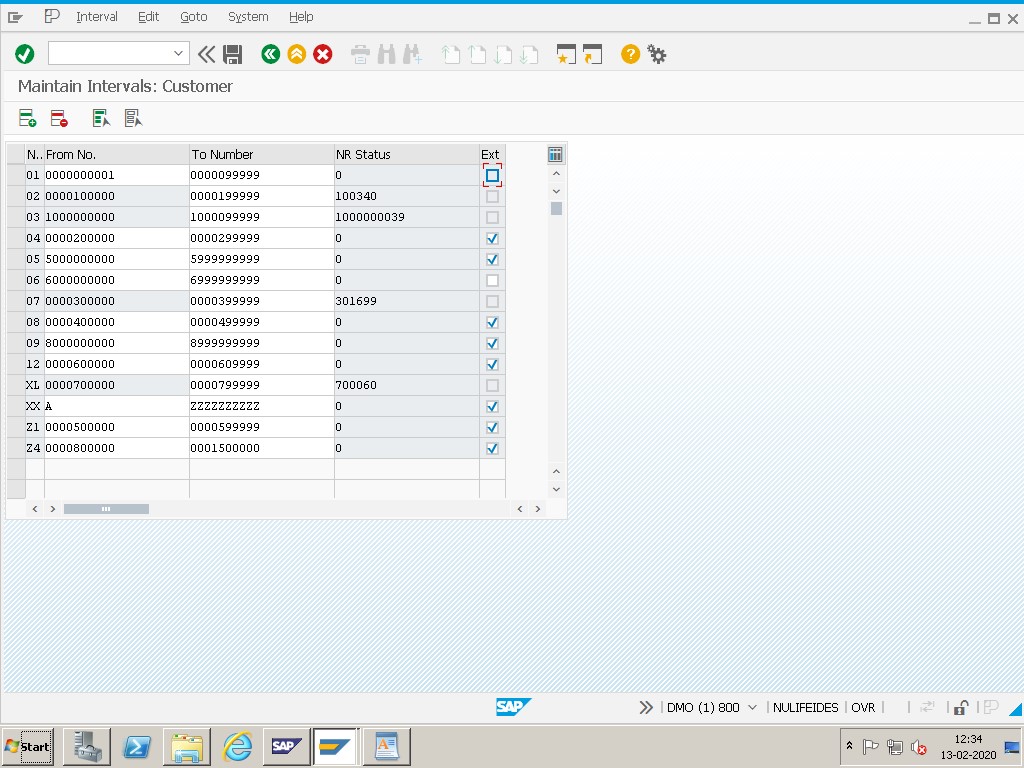
Select – then creating customer XD01.
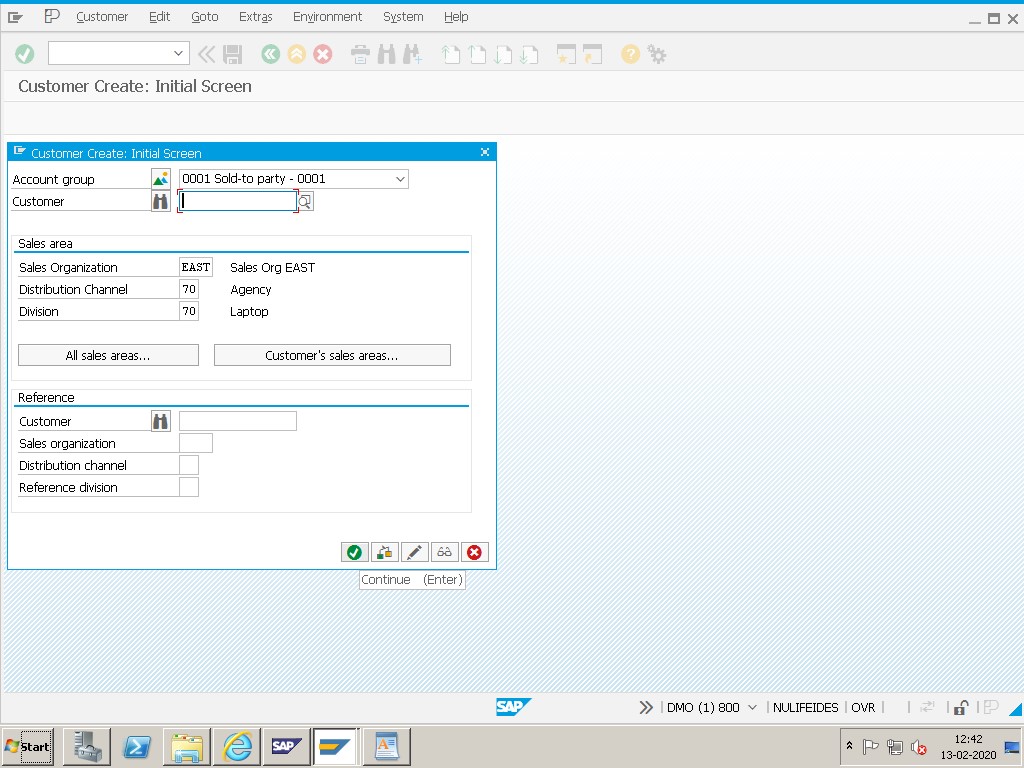
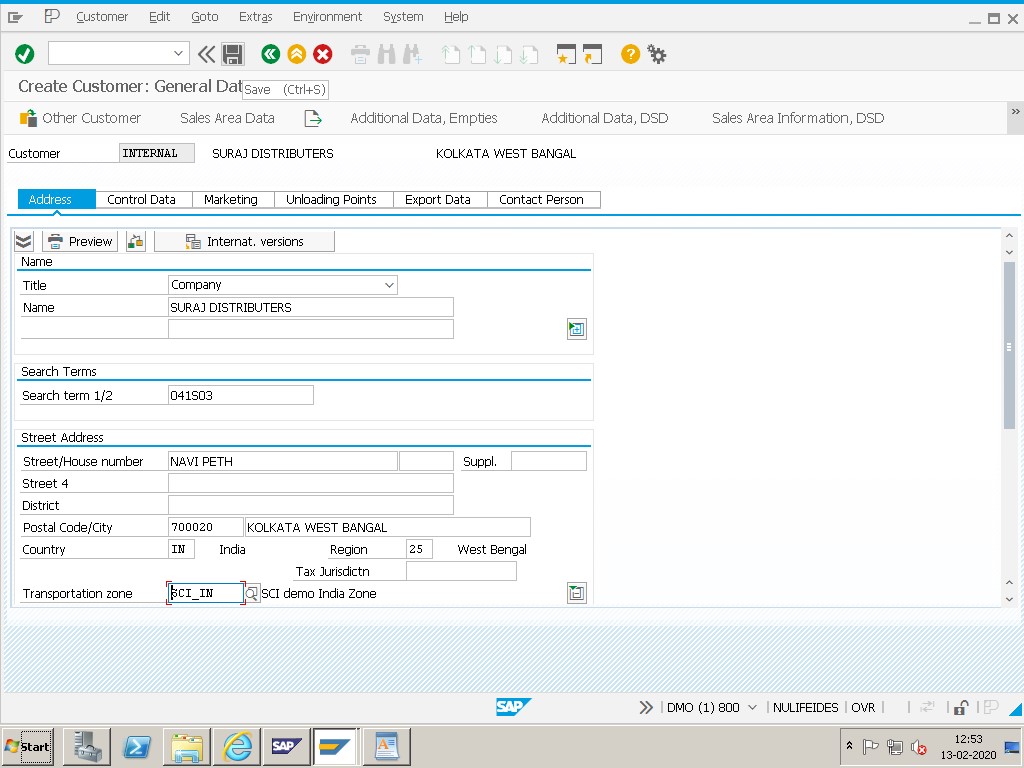
Select – the required reconciliation account FS00.
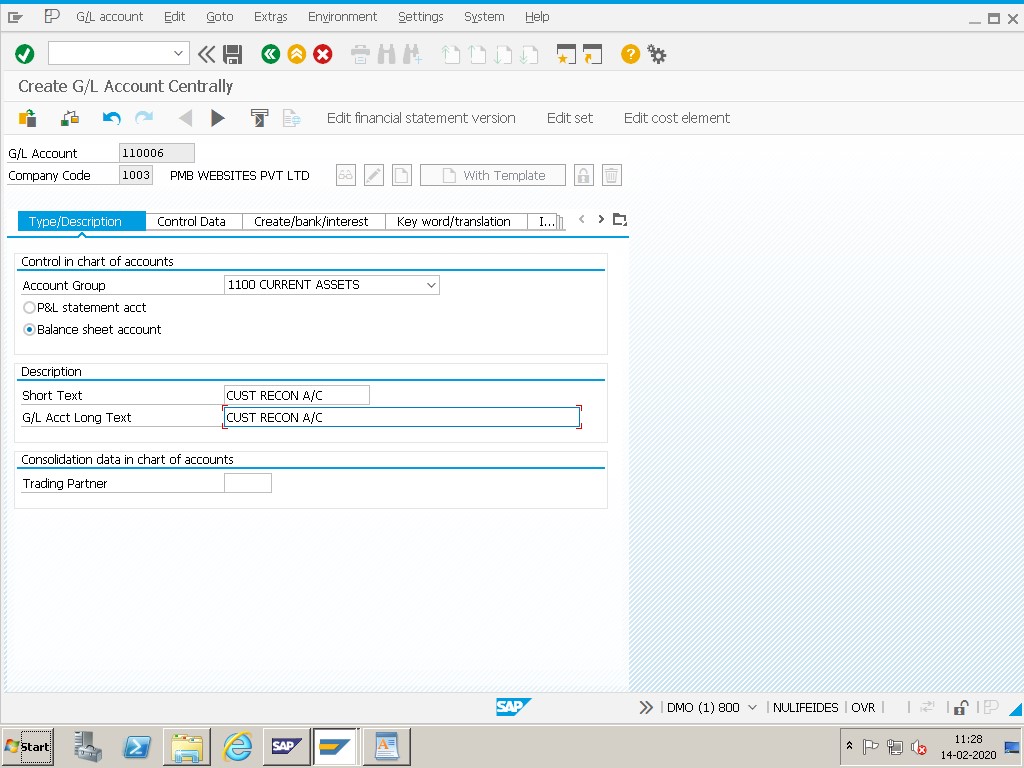
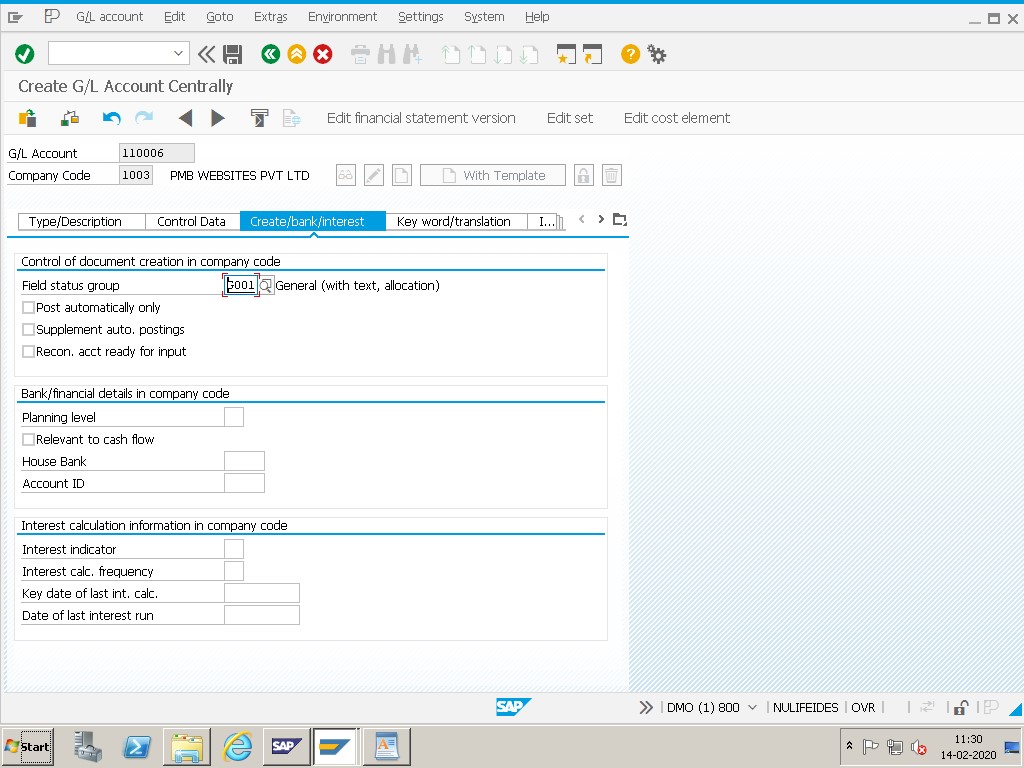
Save. SAP shows a message that the customer was created.
🔄 Two Ways to Solve the Error
| Option | What You Do | When to Choose It |
|---|---|---|
| Enter a valid number | Type a customer number inside the allowed external interval. | The company wants control over customer numbers. |
| Switch to internal numbers | Remove the external indicator so SAP creates numbers automatically. | The company prefers automatic numbering and has no external system supplying numbers. |
The original tutorial removes the external mark, which is the second option. Both are valid, but changing a number range is a configuration change that affects every new customer of that account group, so agree it with the master data team first and move it through the transport process.
💰 The Reconciliation Account for Customers
When a customer is created for a company code, SAP asks for a reconciliation account. This is a G/L account that collects the postings of all customers of that company code, so the total of the customer accounts always matches the general ledger. The account is created or checked with FS00 and must be marked as a reconciliation account for customers.
If the account is missing or has the wrong type, the customer cannot be saved, or the system shows a new message. That is why the original tutorial ends with selecting the required reconciliation account. Agree the account number with the finance team, and use the same account for all customers of the same type, unless the business needs separate accounts for different customer groups.
📋 Values Used in This Guide at a Glance
The table below summarizes every step from the guide, so you can compare it with your own screen before saving.
| Item | Value Used | Note |
|---|---|---|
| Account group | Sold-to party (0001) | Uses external number assignment |
| First step | FBN1, remove external mark | As in the original tutorial |
| Customer creation | XD01 | Create the customer |
| Reconciliation account | FS00 | Required for the company code |
| Final action | Save | Assign a customizing request if prompted |
📝 Notes Before You Save
- Agree with the master data team whether customer numbers should be external or internal.
- Check that no customers exist whose numbers would conflict with a changed range.
- Use a clear numbering scheme if numbers are external, and keep a list of used numbers.
- Make sure the reconciliation account exists and is marked for customers.
- Move number range changes through the transport process and test in the quality system.
- Take a screenshot of the final settings for your documentation.
✅ Verify the Fix
After saving, create the customer again with XD01. If the range is internal, SAP should propose a number automatically. If it is external, enter a number inside the allowed interval. Fill the company code data with the reconciliation account, and save. Then display the customer with XD03 and confirm that the account group, the number and the reconciliation account are correct. If another message appears, for example about a missing sales area, the first problem is solved and the next setting needs attention.
💼 Real-World Scenario: Creating a Sold-to Party at Learn Pharma, Pune
At Learn Pharma in Pune, master data clerk Pooja Patil tried to create a new customer with the account group Sold-to party. SAP stopped her with the message that account group 0001 uses external number assignment and an account number must be specified. She asked functional consultant Neha Deshmukh for help.
Neha checked the number range and found that the range had been left external after a data migration. With master data lead Sameer Joshi she agreed that the company wanted automatic numbers, followed the original steps to remove the external mark, and saved the change on a customizing request. She also checked the reconciliation account with FS00.
After testing in the quality system, the transport moved to production. Pooja created the customer with XD01, SAP proposed the number and the customer was saved. Neha recorded the change in the configuration workbook so that the next migration would end with a checklist item to switch the setting back.
📝 Designing a Customer Numbering Scheme
If your company keeps external numbers, a clear scheme makes life easier. A common approach is to reserve intervals for different customer types, for example one interval for domestic customers, one for exports and one for internal companies. The interval then tells anyone reading a number what kind of customer it is, and a quick check can find numbers used in the wrong range.
| Interval | Customer Type | Rule |
|---|---|---|
| Low interval | Domestic customers | Created by the master data team. |
| Middle interval | Export customers | Created after a credit check. |
| High interval | Internal or one-time customers | Created only on approval. |
The intervals above are only an example. Agree your own with the master data and finance teams, write the rule into the work instruction, and review it once a year.
📦 Number Ranges During Data Migration
Data migration is the most common reason why an account group ends up with external numbers. When customers are loaded from an old system, the project often wants to keep the old numbers, so the range is switched to external for the load. If nobody switches it back, every later user meets the message in this guide.
Plan the switch as part of the migration checklist. Name a responsible person, set a date, and test customer creation with a normal user after the load. Also check that the numbers loaded do not collide with the internal interval, because a collision would block the next automatic number. A short checklist at the end of every migration prevents this error and saves the support team a lot of time.
❗ Common Mistakes When Fixing This Error
- Typing a number outside the allowed external interval.
- Changing the number range in production without testing or approval.
- Forgetting that the change affects every new customer of the account group.
- Leaving the reconciliation account empty or choosing a wrong account type.
- Creating duplicate customers because numbers were chosen by hand without a list.
- Not documenting why the range was switched between internal and external.
🔧 Troubleshooting: When the Message Still Appears
| Symptom | Likely Cause | What to Check |
|---|---|---|
| Same message after the change. | The transport has not reached this client. | Check the request status and import it. |
| Number is rejected. | It is outside the allowed interval. | Check the interval of the number range. |
| Customer cannot be saved. | Reconciliation account is missing or wrong. | Check the account in FS00. |
| Message appears for another account group. | Other groups also use external numbers. | Check all account groups in use. |
| Cannot change the range. | Missing authorization or locked request. | Ask for the right role or an open request. |
✅ Best Practices for Customer Number Ranges
- Choose internal numbers unless there is a clear reason for external ones.
- Keep a written numbering scheme for external ranges.
- Review number ranges after every data migration.
- Keep customer and vendor number ranges documented in one place.
- Limit who may change number ranges in production.
- Test customer creation in the quality system after every change.
🛡 How to Prevent This Error in Future
- Add a number range check to the end of every migration project.
- Train master data staff to read the message and ask before changing anything.
- Use work instructions for customer creation that include the number rule.
- Review account groups once a year for unused or inconsistent settings.
- Keep the master data team and the SAP team in the same kickoff for changes.
📱 This Message in SAP S/4HANA
In SAP S/4HANA, customers and vendors are normally created through the business partner, and number ranges are maintained for business partner groupings. Screens and transactions therefore differ from the classic examples used here. Confirm the exact steps in your own release before you plan the work. The principle does not change: the number range decides whether the number is entered by the user or created by SAP.
🔄 What to Do After the Fix
Once the customer is created, finish the job. Extend the customer to the sales area, check the partner functions and the payment terms, and test a sales order. Update your configuration documentation with the final number range setting and the transport number.
If your company later migrates more customers, plan the number range first. Decide whether the migration needs external numbers, use them only for the load, and switch the range back afterwards, with a named person responsible for the switch.
🎓 Interview-Style Questions and Answers
Q: What does external number assignment mean?
The user enters the number by hand, inside an allowed interval.
Q: Why did SAP ask for an account number?
Because the account group Sold-to party uses external number assignment.
Q: How can the error be solved?
By entering a valid number or by changing the range to internal.
Q: Which account is needed when a customer is created?
A reconciliation account in the company code data.
Q: Is a transport needed?
Number range changes are customizing and normally move through the landscape.
📚 Quick Glossary of Terms Used in This Guide
- Account Group: A group that controls how customers are created, such as which fields are required and which number range is used.
- Sold-to Party: The customer who places the order.
- External Number Assignment: A setting where the user enters the number.
- Internal Number Assignment: A setting where SAP creates the number.
- Reconciliation Account: A G/L account that collects the postings of all customers of a company code.
- Number Range: The interval of numbers available for an object.
🎯 Conclusion
The error "Acct group Sold-to party 0001 uses ext. no. assignment. Specify an account number" has a simple cause: the account group expects a number that the user did not give. Follow the steps in this guide: remove the external mark as shown in the original tutorial, create the customer with XD01, select the required reconciliation account with FS00 and save. Then test the customer and record the setting. If you run into any errors while following along, feel free to send a screenshot to pramod@learntosap.com for help.