How to Define a Sales Office in SAP SD (OVX1)
Sales office represents a physical or organizational sales location - a regional branch, a country office, or a territory - and it is the organizational unit that sits between sales area and sales group in the SD structure. This guide walks through transaction OVX1 end to end, explains what sales office actually controls once it is live, and covers the sales area and sales group assignments needed afterward before the new office can actually be used. If you run into any errors while following along, feel free to send a screenshot to pramod@learntosap.com for help.
✅ What Is a Sales Office in SAP SD?
Sales office in SAP SD is an organizational element used to represent a specific geographical location, region, or branch where sales activities are managed. Unlike sales group, which represents a team of people, sales office represents a place - a physical address that customers, correspondence, and regional reporting can all be tied back to.
Grouping sales activity by location this way gives a business a clean way to manage regional operations independently: a regional sales manager can review performance, backlog, and open orders for their own office without wading through data from every other region, and correspondence such as quotations and order confirmations can carry the correct regional address rather than a single generic company header.
Sales office is never used entirely on its own; it is assigned to a sales area (the combination of sales organization and distribution channel) so it becomes usable on customer master records and sales documents, and it typically has one or more sales groups assigned underneath it, representing the actual sales teams working out of that location.
📋 Where Sales Office Fits in the SD Organizational Structure
Sales office sits in the middle of the broader SD organizational structure - below sales area, above sales group. Seeing how it relates to the units above and below it makes the assignment steps later in this guide much easier to follow.
| Organizational Unit | Role | Typical Transaction |
|---|---|---|
| Sales Organization | The top-level SD unit responsible for selling and distributing goods. | OVX5 |
| Distribution Channel | Describes how goods reach the customer - for example wholesale, retail, or direct sales. | OVXI |
| Sales Area | The combination of sales organization and distribution channel that a sales office is assigned to. | OVXG |
| Sales Office | Represents a physical or organizational sales location; created here. | OVX1 |
| Sales Group | Represents a team of salespeople, assigned underneath a sales office. | OVX4 |
Because sales documents ultimately reference sales organization, distribution channel, division, sales office, and sales group together, defining the sales office in OVX1 is only the first of several configuration steps for a genuinely new regional presence. It is, however, a required first step, since the sales area assignment and sales group linkage that follow both depend on the sales office already existing.
🔧 Step-by-Step: Defining a Sales Office Using OVX1
Unlike division and distribution channel, sales office is typically created directly as a new entry rather than copied from a reference, since each office usually has its own unique address and doesn't inherit much dependent configuration the way division does. That said, the steps still need to be followed carefully, particularly around address data and the sales area assignment that comes afterward.
Run transaction OVX1 directly, or follow the IMG path: SPRO → Enterprise Structure → Definition → Sales and Distribution → Maintain Sales Office.
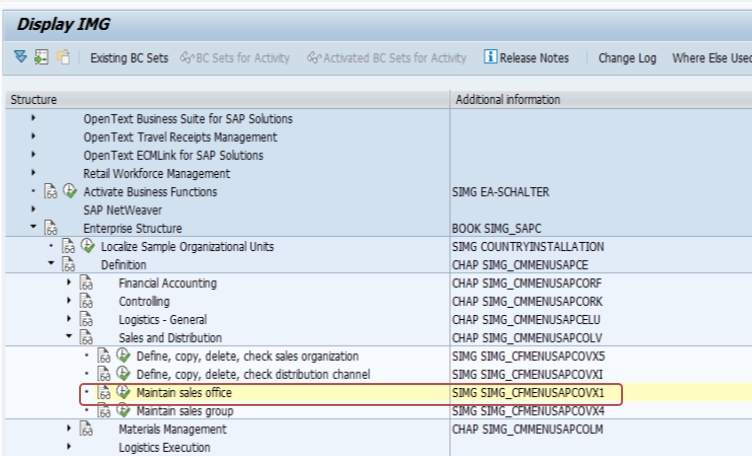
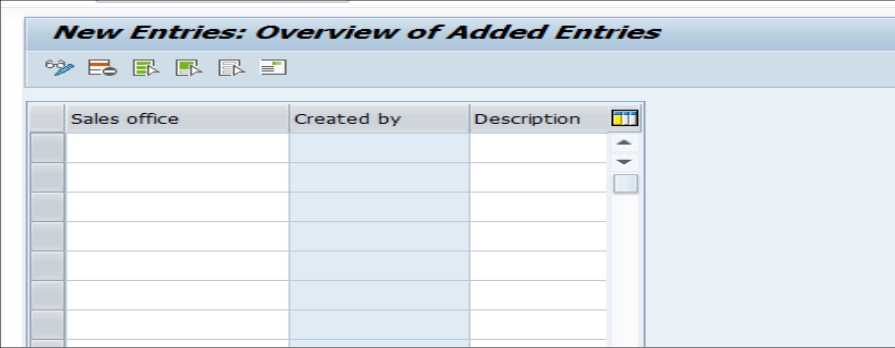
From the activity list, select Maintain Sales Office, then click New Entries to open a blank record for the new office.
Enter the new Sales Office code (4 characters) and a clear, business-meaningful description - for example a regional branch name rather than a generic label. Complete the address fields - street, city, region, postal code, and country - since this address is frequently reused on quotation and order confirmation output.
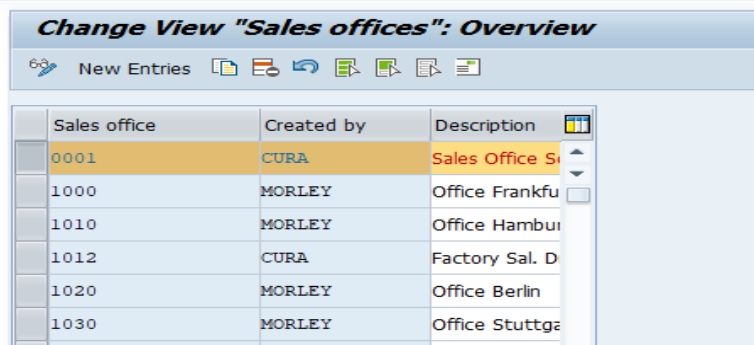
Save the entry. If prompted, enter or select a transport request, since this is transportable IMG configuration. At this point the office exists in the system but is not yet usable on sales documents.
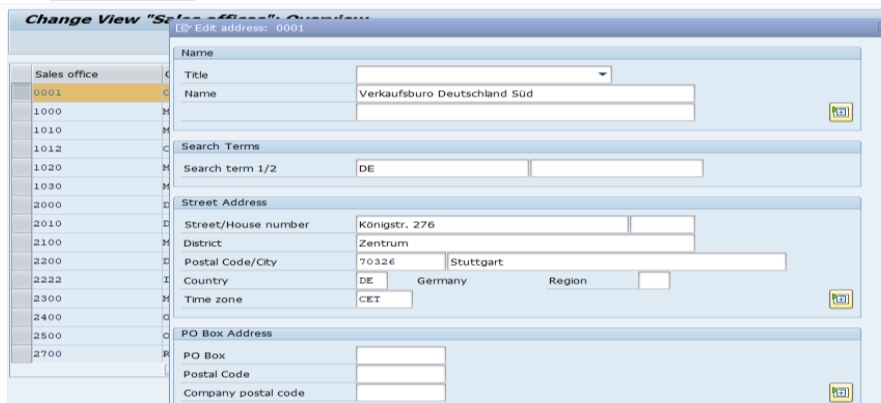
Navigate to SPRO → Enterprise Structure → Assignment → Sales and Distribution → Assign Sales Office to Sales Area, and link the new office to the relevant sales organization and distribution channel combination.
Save the assignment. The sales office is now part of a usable sales area, though it still needs one or more sales groups assigned underneath it (via OVX4) before end users see a complete, functioning regional sales structure.
🔍 What Actually Happens Behind the Scenes
Creating a sales office in OVX1 writes a new entry to table TVKBZ (basic sales office data) along with the associated address record, which is stored using SAP's standard central address management (table ADRC) rather than as simple flat fields. This is why the address entered during OVX1 can later be reused consistently across output forms, correspondence, and even other applications that reference the same address object - it isn't just cosmetic text sitting in the sales office record.
Unlike division, sales office does not typically carry dependent configuration that needs to be copied from a reference record - there's no equivalent "copy, delete, check" activity for sales office in most systems, since each office is expected to have its own distinct address and doesn't usually inherit pricing or credit management defaults the way division does. This makes OVX1 itself a comparatively quick step; the real design work is in deciding how many offices the business needs and where their boundaries should fall.
It's worth being clear that creating the sales office record does not automatically assign it to a sales area, and it does not automatically create any sales groups underneath it. Those are separate steps, described below, and none of them happen automatically just because the sales office itself was created.
📋 What to Configure Next After OVX1
Defining the sales office is an early step, not the final one. Before sales documents can actually reference the new office, further steps are required:
- Assign the sales office to a sales area, combining it with the relevant sales organization and distribution channel, so it can actually be referenced on customer master records and sales documents.
- Define and assign sales groups underneath the office using transaction OVX4, representing the actual teams operating from that location.
- Extend customers to the new sales office where needed, confirming customer master records are maintained with the correct sales organization, distribution channel, and sales office combination.
- Review output and correspondence forms that reference the office address, confirming the new office prints or emails correctly on quotations and order confirmations.
Only after these steps are complete can end users select sales documents against the new office. A sales office that exists in OVX1 but has not yet been assigned to a sales area typically will not appear as a valid combination at all, rather than producing a clear error message pointing back to the missing configuration.
📋 Sales Office, Sales Group, and Distribution Channel - How They Differ
Sales office is frequently confused with sales group and distribution channel, since all three sound like they might describe "where" or "how" a sale happens. The distinction matters because they are maintained independently and serve different purposes. Sales office is a physical or organizational location - a branch, a regional hub, a country office - assigned to a sales area and typically carrying its own address for correspondence.
Sales group, by contrast, is a team of people rather than a place; it is defined separately in OVX4 and assigned underneath a sales office, so a single office can have several sales groups (new business, renewals, key accounts, and so on) operating from the same physical location. Distribution channel is different again - it describes how goods reach the customer (wholesale, retail, direct sales) and is combined with sales organization and division to form the sales area that a sales office is ultimately assigned to.
A material can be sold through the same distribution channel from several different sales offices, and a single sales office can have several sales groups underneath it - the three concepts are independent dimensions that combine together, not a strict single hierarchy with only one valid path through it.
💼 Real-World Scenario: Setting Up a New Regional Sales Office
Pradnya Pawar, an SAP SD consultant supporting a national distribution company headquartered in Pune, was asked to set up a new sales office for the company's expansion into the eastern region, where the business had just signed a lease for a regional branch. Pradnya created the new office in OVX1 with a clear description - "East Region Branch - Kolkata" - and carefully entered the full branch address, since the sales team had specifically requested that quotations sent to new eastern-region customers show the local branch address rather than the head office address in Pune.
Anand Rathi, the regional sales manager who would be running the new branch, asked whether he could start creating sales orders for the new region as soon as the office was saved in OVX1. Pradnya explained that the office needed to be assigned to the company's existing sales area first, and that the two sales groups Anand wanted - one for new business and one for key accounts - still needed to be defined in OVX4 and assigned underneath the new office before his team could actually process a single order.
After completing the sales area assignment and creating both sales groups, Pradnya extended a handful of test customer master records to the new sales office and askedAnand team to create a test quotation. Only once that test quotation printed correctly with the Kolkata branch address did Pradnya confirm the setup was genuinely ready for the wider east-region customer base to be onboarded - a reminder that the OVX1 record itself was just the starting point of a multi-step rollout, not a complete configuration on its own.
❗ Common Mistakes When Defining a Sales Office
- Saving a new sales office without completing the address fields, which only surfaces as a problem later when correspondence or output tries to reference the office.
- Forgetting to assign the new sales office to a sales area, leaving it technically defined but unusable on any sales document.
- Creating a sales office for every individual salesperson instead of using sales group for that purpose, resulting in an unnecessarily fragmented and hard-to-maintain office structure.
- Assuming a new sales office automatically has sales groups underneath it, when in fact sales groups must be defined and assigned separately.
- Copying an existing customer master's sales area data without checking whether the sales office field also needs to change for customers now served by the new office.
- Building the sales office structure around SAP configuration convenience rather than how the business genuinely organizes its regions, producing reporting that doesn't match how leadership actually thinks about territories.
✅ Best Practices for Sales Office Setup
- Always complete the full address for a new sales office at the time it's created, rather than planning to circle back later.
- Choose a 4-character coding scheme early - for example region plus sequence number - so codes stay meaningful as the structure grows.
- Align sales office boundaries with how the business actually manages its regions, not with whatever grouping is fastest to configure.
- Treat the sales area assignment and sales group linkage as required next steps, not optional follow-ups.
- Coordinate sales office design with sales group design together, since the two are almost always planned and rolled out as a pair.
- Document the office-to-region mapping outside SAP as well, so new team members don't have to reverse-engineer what each code represents.
- Test the full setup in a sandbox or development client, including a sample quotation printout, before migrating the configuration to production.
💰 How Sales Office Supports Territory-Based Pricing and Correspondence
While sales office is used less often than division as a direct pricing condition field, it plays an important supporting role in territory-based selling. Because each office can carry its own address, output determination can be configured so quotations, order confirmations, and invoices reference the correct regional branch address automatically, based on which sales office is on the document - something a single company-wide address simply cannot do.
Some organizations also use sales office as an access field in specific pricing condition tables where regional pricing genuinely differs - for example, freight or handling surcharges that vary by branch due to different local logistics costs. As with any pricing configuration, this only works if condition records are actually maintained referencing sales office; defining the office in OVX1 makes this possible but does not create the pricing differentiation on its own.
Sales office is also commonly used in partner determination, allowing internal notifications, approval routing, or regional sales manager assignment to be driven off which office a document belongs to, rather than requiring a fully manual routing process for every order.
🔒 Authorization Considerations for a New Sales Office
Because sales office feeds into sales area combinations on every sales document, many organizations restrict which users can view, create, or release documents for a given office using standard SD authorization objects checked by sales organization, distribution channel, and sales office together. This is especially relevant when a new office represents a newly opened region where only a specific regional team should have access, rather than the entire company.
A common oversight after creating a new sales office is assuming existing users can immediately work with it. If security roles are built around explicit sales office values rather than a wildcard, the new office needs to be added to the relevant roles before the regional team can actually process documents against it - otherwise the rollout stalls on authorization errors unrelated to the OVX1 configuration itself.
Loop in the security or Basis team as soon as a new office is requested, so role updates can be tested alongside the sales area and sales group build rather than becoming a late-stage blocker right before the regional team's go-live date.
🔧 Troubleshooting Common OVX1 Errors
"Sales office does not exist" on a customer master or sales order
This means the office code hasn't been created yet, or exists in one client but hasn't been transported to the client being used. Confirm the entry exists in table TVKBZ for the relevant client.
Sales office not appearing in the dropdown when creating a sales order
Almost always means the office was created in OVX1 but never assigned to a sales area. Revisit the assignment step covered earlier in this guide.
Address missing or incomplete on printed quotations
Check whether the address fields were actually populated when the office was created - it's common to save a sales office quickly with just a code and description, planning to add the address later, and then forget.
New sales office visible in configuration but no sales groups selectable underneath it
This is expected until sales groups are defined in OVX4 and explicitly assigned to the new office - a sales office does not automatically inherit or create sales groups.
Changes not visible in QA or Production
As with any enterprise structure change, confirm the transport was released and imported; OVX1 changes are client-independent configuration but still require a transport to move between systems.
🏢 How Different Industries Typically Structure Sales Offices
Because sales office is meant to reflect real, physical sales locations, the right structure looks quite different across industries:
- National distributors and FMCG: Sales offices typically map to regional distribution hubs, aligning with warehouse and logistics footprints as much as pure sales territory.
- Multinational manufacturers: Sales offices often represent country-level presence under a shared regional or global sales organization, letting local teams manage relationships while corporate reporting stays consolidated.
- Professional services and B2B software: Sales offices may represent metro-area hubs rather than full branch locations, since sales teams are often more mobile and less tied to a single physical storefront.
- Franchise and dealer networks: Sales offices frequently represent dealer or franchise hubs, allowing dealer-specific correspondence and performance tracking without a separate sales organization per dealer.
As with division, there's no single correct structure prescribed by SAP - the important design principle is consistency, so that sales office boundaries map cleanly onto a single, stable way of dividing the business rather than mixing logics that make reporting harder to interpret over time.
📋 Sales Office Rollout Checklist
- Confirm the business genuinely needs a new physical or organizational location, rather than an additional sales group under an existing office.
- Create the sales office in OVX1 with a clear, unambiguous description and a complete address.
- Assign the new office to the correct sales area (sales organization and distribution channel).
- Define or reuse the relevant sales groups and assign them underneath the new office.
- Update authorization roles so the regional team can actually process documents for the new office.
- Review output/correspondence forms and confirm the new address prints or emails correctly.
- Extend relevant customer master records to the new sales office.
- Run a test quotation or sales order before considering the office ready for end users.
📈 How Sales Office Powers Regional Sales Reporting
Beyond its role in sales area and correspondence, sales office is one of the most commonly used fields for regional performance reporting, precisely because it maps directly onto the physical, territorial way most sales leadership already think about their business. Standard SD reports, along with most custom or embedded analytics reports built on sales order and billing data, support filtering and grouping by sales office without additional development.
This reporting value only holds up if the sales office field is populated consistently across relevant customer master records and sales documents. A rollout where some customers are extended to the new office immediately and others migrated gradually produces reporting that looks unreliable during the transition, with regional figures shifting for reasons unrelated to actual sales performance. Planning the customer master update as a coordinated activity, rather than a gradual one, avoids this and gives regional managers clean numbers from the first reporting cycle after go-live.
📊 Sample KPIs and Dashboards Built Around Sales Office
- Revenue by region/office, trended over time: Lets leadership compare regional performance directly, since sales office maps cleanly onto how territories are actually managed.
- Open order backlog by office: Helps regional managers anticipate fulfillment pressure specific to their own branch or territory.
- New customer acquisition by office: Frequently the first metric a newly opened regional office is measured against.
- Sales group performance within an office: Combines sales office and sales group filters to compare teams operating from the same location.
As with any organizational-unit-based reporting, the numbers are only as trustworthy as the underlying master data - a sales office that was never properly assigned to a sales area, or customer records left pointing at the wrong office after a reorganization, will quietly undermine every dashboard built on top of it.
📱 This Configuration in SAP S/4HANA
Transaction OVX1 works the same way in SAP S/4HANA as in classic ECC, since sales office remains a foundational SD organizational element unaffected by the Universal Journal or the simplified data model. The downstream sales area assignment and sales group linkage are also unchanged. What differs in S/4HANA is mainly on the analytics side: embedded analytics and Fiori apps make it considerably easier to build near-real-time regional dashboards filtered by sales office, which raises the practical importance of getting the office structure and address data right from the start, since a poorly planned setup becomes visible more quickly once it feeds directly into live regional dashboards.
📋 Related SAP Transactions
| Transaction | Purpose |
|---|---|
| OVX1 | Define and maintain sales offices. |
| OVX4 | Define sales groups, assigned underneath a sales office. |
| OVX5 | Define, copy, delete, and check sales organizations. |
| OVXI | Define, copy, delete, and check distribution channels. |
| OVXG | Set up a sales area by combining sales organization, distribution channel, and division. |
| XD01 / XD02 | Create or change a customer master record, including its sales office field. |
🎓 Interview-Style Questions and Answers
Q: Why is sales office usually created directly instead of copied from a reference, unlike division?
Because sales office typically carries its own unique address and doesn't usually inherit dependent configuration like pricing or credit management defaults the way division does, so there's less benefit to copying and more risk of accidentally carrying over an address that belongs to a different location.
Q: What is the practical advantage of maintaining a full address on a sales office?
The address is stored using SAP's central address management and can be reused consistently across quotation, order confirmation, and other correspondence output, giving each region its own correct "from" address automatically rather than requiring manual overrides on every document.
Q: Can a sales office created in OVX1 be used immediately on a sales order?
No. It must first be assigned to a sales area, and in most implementations also needs at least one sales group assigned underneath it, before it functions as a complete, usable combination on a live sales document.
Q: How is sales office different from sales group, given both seem to describe "who handles" a sale?
Sales office is a location - a branch or region - while sales group is a team of people operating from that location. The two are defined with separate transactions (OVX1 and OVX4) and combined together, with sales group nested underneath sales office.
Q: Why does a coordinated customer master rollout matter more for sales office than for most other master data changes?
Because sales office feeds directly into regional sales reporting and correspondence, updating some customers immediately and others gradually creates a period where regional figures shift for reasons unrelated to actual sales performance, undermining confidence in the numbers exactly when a newly opened region is being watched most closely.
📚 Quick Glossary of Terms Used in This Guide
- Sales Office: An organizational element representing a physical or organizational sales location, such as a regional branch or country office.
- Sales Area: The combination of sales organization and distribution channel that a sales office is assigned to.
- Sales Group: A team of salespeople, defined separately and assigned underneath a sales office.
- VKBUR: The technical SAP field name for sales office, appearing on the sales document header table VBAK.
- Central Address Management (ADRC): The shared SAP address table used to store and reuse a sales office's address across output and correspondence.
- Output Determination: The configuration that decides how and where a document, such as a quotation, is printed or sent - including which address is used.
📝 Naming and Governance for New Sales Offices
Sales office codes are 4 characters in SAP, giving slightly more room than division or distribution channel codes to build in a meaningful abbreviation - a region prefix plus a sequence number, for example. Even so, the code alone rarely communicates enough on its own without an internal reference document describing what each office represents, particularly once a company operates a dozen or more regional locations.
Governance matters here for similar reasons as with division. Because a new sales office typically implies real business investment - a physical branch, a regional team, and often dedicated address and correspondence setup - many organizations require a documented business case before a new office is created, confirming that the region or territory genuinely needs its own sales office rather than being served by an existing one. Deciding this early is usually what keeps an organization's sales office structure clean and meaningful over time, rather than accumulating overlapping or redundant regional entries.
🎯 Conclusion
Defining a sales office in OVX1 is a short transaction, but because it usually represents a genuine physical location, getting the address, naming, and downstream assignments right has a visible, immediate impact on both regional reporting and customer-facing correspondence. The follow-up steps - assigning the office to a sales area and linking the relevant sales groups underneath it - are not optional extras but required steps before the new office delivers the regional structure the business actually asked for. Keep this guide handy the next time your project needs to open a new region, branch, or territory in SAP SD.