Maintain Tolerance Limits for Tolerance Key SE (CoCode 1213) -SAP Error Solution
Tolerance limits are set using configuration for various business scenarios such as purchase order price variances, goods receipt/invoice receipt differences, or cash discounts. Tolerance key SE specifically deals with small differences allowed in payment processing for a company code -this guide covers the exact fix, then goes deeper into what tolerance key SE actually controls, how it compares to other tolerance keys, a real business scenario, and a full configuration reference.
✅ Common Error Message
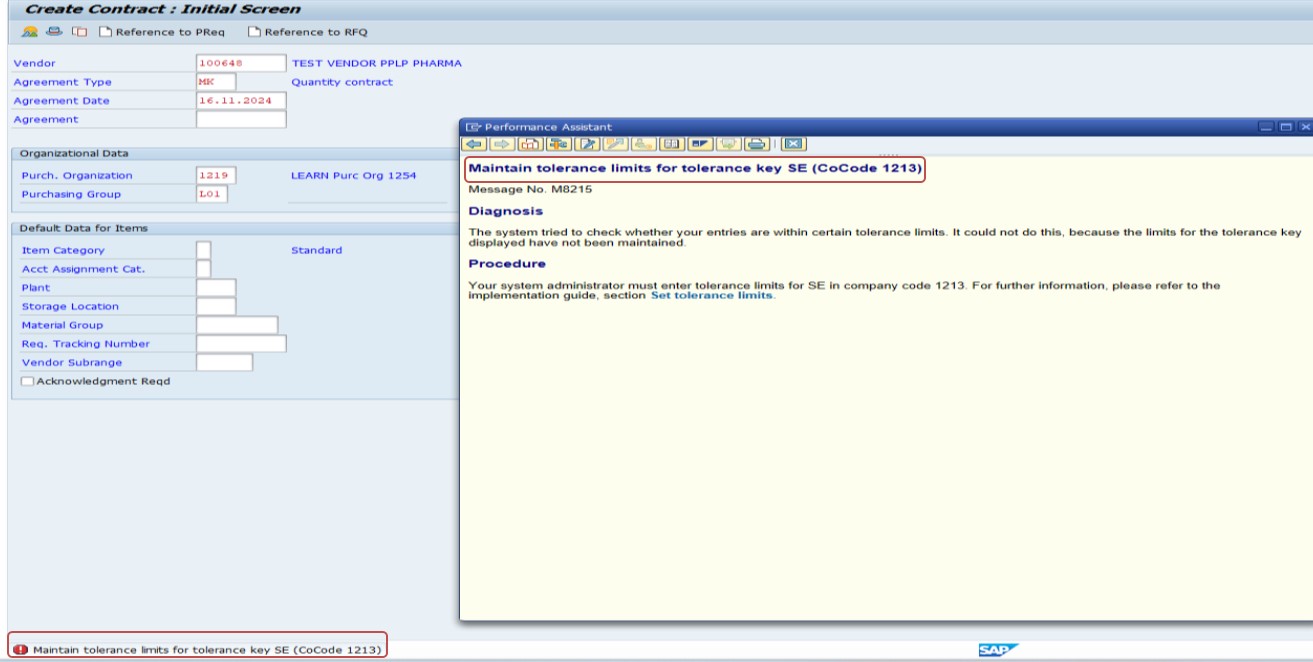
Tolerance limits are set using configuration for various business scenarios such as purchase order price variances, goods receipt/invoice receipt differences, or cash discounts. The tolerance key SE specifically deals with small differences allowed in payment processing for a company code.
🔧 Solution: OBA3 -Define Tolerances (Payment Differences)
Path: SPRO → Financial Accounting → Accounts Receivable and Accounts Payable → Business Transactions → Outgoing Payments → Manual Outgoing Payments → Define Tolerances (Payment Differences).
Note: the transaction for this specific path is OBA3. (The original configuration note referenced OMEU, which is actually a different, Materials Management transaction for purchase order price variance tolerances -corrected here to match the path and screens shown below.)
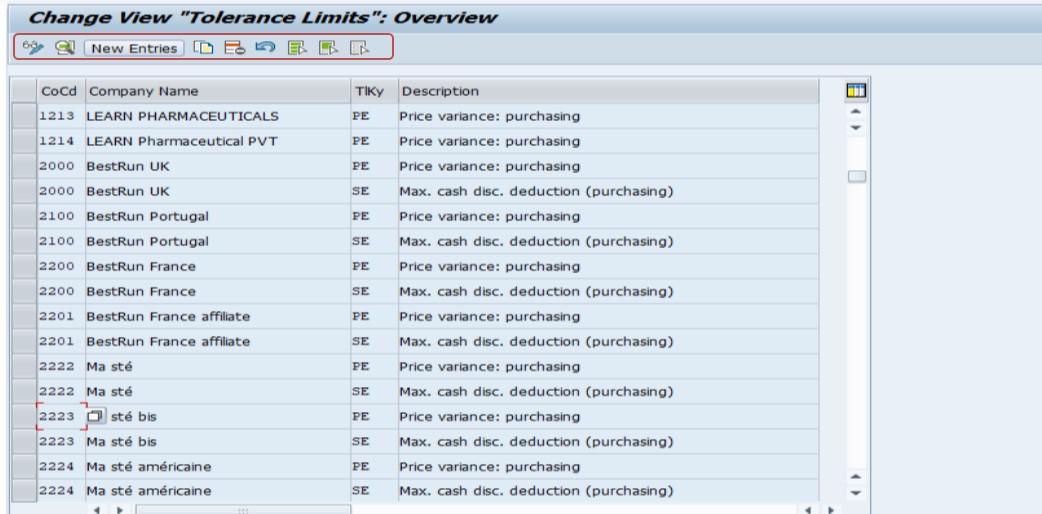
Select New Entry.
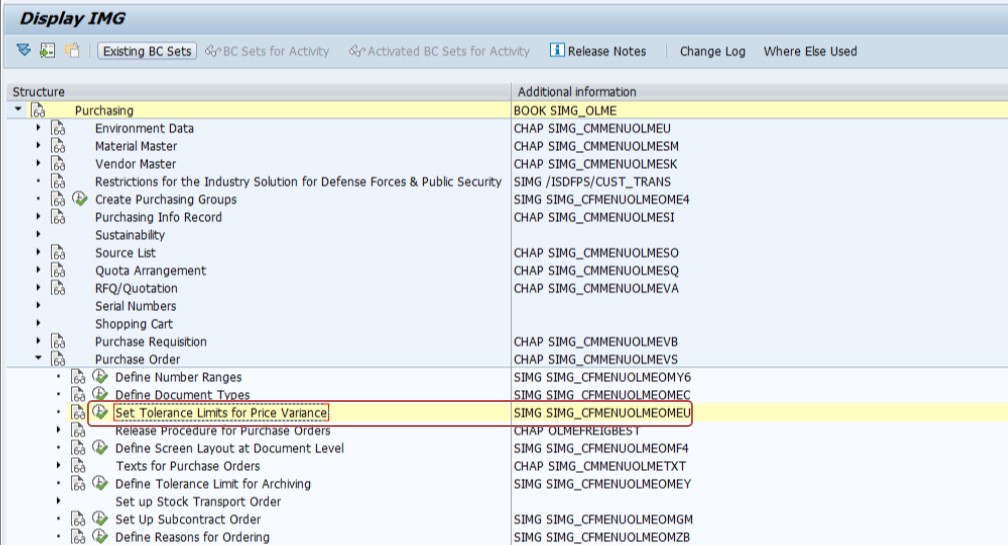
Select Tolerance Key -SE.
Select Company Code -1213.
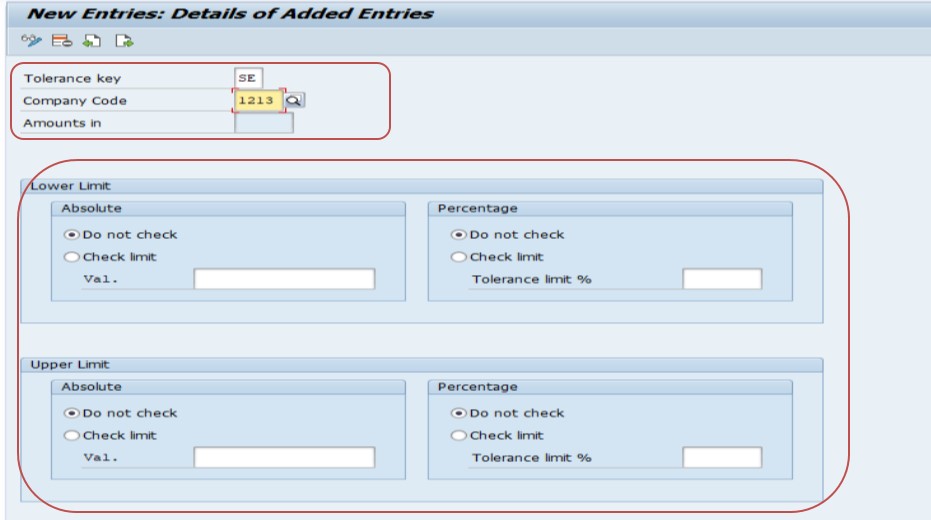
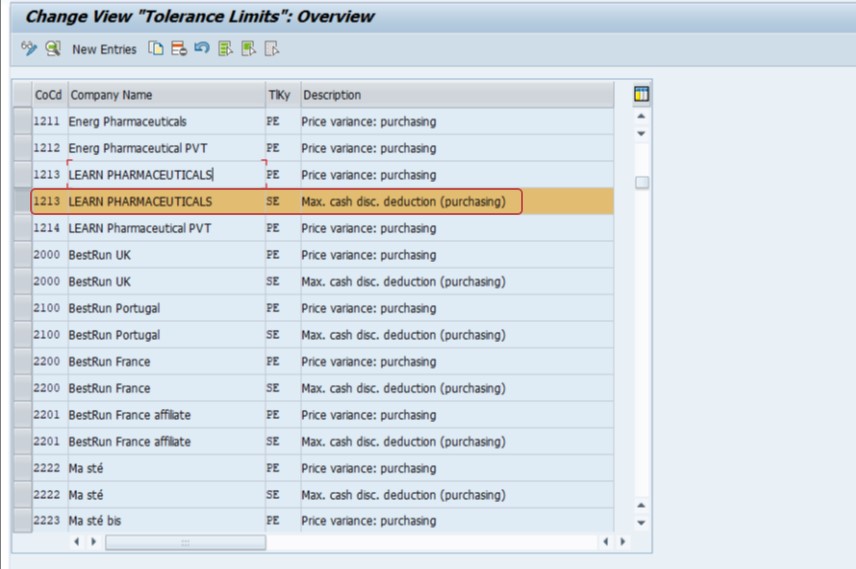
Amount Limits (per Document)
- Debit (LC): Maximum amount difference allowed for underpayment (in local currency -INR).
- Credit (LC): Maximum amount difference allowed for overpayment (in local currency -INR).
Example
For CoCode 1213:
- Debit Tolerance: ₹100
- Credit Tolerance: ₹100
- Percentage: 1%
This configuration allows small payment differences of up to ₹100 or 1% of the invoice amount, whichever is lower.
Save.
🔍 What Tolerance Key SE Actually Controls
When a customer or vendor payment doesn't exactly match the invoiced amount -a common real-world occurrence due to bank charges, rounding, or a customer simply paying slightly less or more than invoiced -SAP needs a rule for what to do with that small difference. Tolerance key SE governs exactly this scenario for manually processed outgoing payments: it defines, per company code, how large a difference (in absolute amount and/or percentage) is small enough to be automatically written off or posted to a designated gain/loss or cash discount adjustment account, rather than blocking the payment or forcing the person posting it to manually research and correct every minor discrepancy.
Without a tolerance group configured for SE in a given company code, SAP has no threshold to compare the payment difference against, and rather than guessing, it stops the transaction and asks for that threshold to be defined first -which is exactly the error this guide addresses.
📋 Other Common SAP Tolerance Keys (Not to Be Confused With SE)
SAP uses several different tolerance keys across FI and MM, each governing a different business scenario, which is exactly why the original configuration note's transaction mix-up (OMEU vs OBA3) is such an easy one to make -many of these keys sound similar but live in entirely different configuration areas.
| Tolerance Key | Area | Governs | Configured Via |
|---|---|---|---|
| SE | FI -Accounts Payable/Receivable | Payment differences on manual outgoing payments | OBA3 |
| DIF | FI -Accounts Payable/Receivable | General small differences during clearing/posting | OBA3 |
| (unnamed, employee tolerance groups) | FI -General Ledger | Which posting amounts and variances a user/employee group can process | OBA4 |
| PP / PP2 / SD | MM -Purchasing | Purchase order price variance tolerances (over/under delivery, price) | OMEU / OMEV |
| BD / VP | MM -Invoice Verification | Quantity and price variance tolerances at invoice verification (MIRO) | OMR6 |
Notice that OMEU genuinely exists and genuinely governs tolerance limits -just for a different domain (MM purchasing price variance) entirely separate from the FI payment-difference scenario tolerance key SE addresses. This is precisely the kind of mix-up worth double-checking whenever a configuration note references a transaction code, since two tolerance-related transactions with similar-sounding purposes can easily be confused.
✅ Prevention Checklist for FI Configuration Teams
- Add "configure OBA3 tolerance groups (including SE and other relevant keys)" as a standard item on every new company code go-live checklist.
- Agree tolerance amounts and percentages with finance leadership per company code, rather than copying limits from another entity without review.
- Also configure OBA4 employee tolerance groups alongside OBA3, since the two work together to control who can post what and how much variance they can accept.
- Periodically review actual payment differences being written off against configured tolerance limits, to confirm the thresholds still reflect an acceptable business risk.
- Document which transaction governs which tolerance scenario (OBA3 for FI payment differences, OMEU for MM price variance, OMR6 for invoice verification) to prevent future configuration mix-ups.
📱 This Error in SAP S/4HANA
Tolerance group configuration (OBA3, OBA4) and tolerance key SE work identically in SAP S/4HANA as in ECC, since this is foundational FI configuration rather than something restructured by the Universal Journal. On the interface side, Fiori apps such as "Clear Outgoing Payments" and "Manage Payments" apply the same underlying tolerance logic as classic transactions like F-53, so a missing tolerance configuration produces the same blocking behavior whether payments are processed through SAP GUI or Fiori.
📑 Similar-Looking SAP Tolerance / Payment Errors
| Error | Configuration Area | Fix |
|---|---|---|
| Maintain tolerance limits for tolerance key SE | FI -payment differences (OBA3) | Add a tolerance group entry for the company code and tolerance key SE |
| Account can only be posted to internally in company code | FI -G/L account posting restriction (FS00) | Check the Post Automatically Only checkbox and reconciliation account status |
| Rules for posting key X and account Y set incorrectly | FI -posting key/account field status conflict (OB41/FS00) | Align field status groups between the posting key and account |
| PO price variance exceeds tolerance | MM -purchasing (OMEU) | Review and adjust price variance tolerance limits in OMEU, separate from OBA3 |
All of these involve some form of configured limit or restriction blocking a transaction, but each lives in a distinct configuration area -recognizing which one applies to your specific error message (payment difference vs. posting restriction vs. purchasing variance) points you to the right transaction immediately.
💼 Real-World Scenario: A New Company Code Missing Its Tolerance Setup
Pooja Mishra, an SAP FI analyst, was processing outgoing vendor payments for a newly onboarded company code, 1213, when a routine payment with a small rounding difference (a common outcome of bank transfer fees) triggered this exact error. Her first instinct was to treat it as a one-off system issue, since payments for the company's other, longer-established company codes never showed this problem.
Checking with her configuration team, she learned that tolerance groups in OBA3 are maintained per company code -meaning the fact that other company codes had SE tolerance limits configured didn't automatically extend to the newly created 1213. This was a simple oversight from the new company code's go-live checklist, not a data error on the specific payment. Once the team added a new entry for company code 1213 with tolerance key SE, debit/credit limits of ₹100, and a 1% percentage tolerance, Ritika's payment posted successfully, and every future payment for that company code with a similarly small difference would now be handled automatically rather than blocking processing.
❗ Common Mistakes When Fixing This Error
- Confusing tolerance key SE (FI payment differences, OBA3) with MM purchasing price variance tolerances (OMEU), which are unrelated despite both being called "tolerance" configuration.
- Setting overly generous tolerance limits just to stop the error from appearing, without considering the actual business risk of automatically writing off larger discrepancies.
- Configuring tolerance limits for one company code and assuming they apply company-code-wide across the whole organization.
- Not distinguishing between the flat amount limit and the percentage limit -SAP applies whichever is lower, so both fields need to be set thoughtfully together.
- Forgetting to also configure OBA4 (employee tolerance groups) if the broader posting authorization, not just payment differences, also needs limits.
📈 Troubleshooting Decision Tree
- Confirm the exact company code referenced in the error.
- Go to OBA3 and check whether a tolerance group already exists for tolerance key SE and that company code.
- If none exists, create a new entry with appropriate debit, credit, and percentage limits, agreed with finance leadership for that company code's risk tolerance.
- If the company code is newly created, check whether other standard tolerance configuration (OBA4, and MM-side OMEU/OMR6 if relevant) was also missed during go-live.
- Retest with the original payment to confirm the difference now falls within the newly configured tolerance.
📋 Related SAP Transactions
| Transaction | Purpose |
|---|---|
| OBA3 | Define tolerance groups for payment differences (includes tolerance key SE). |
| OBA4 | Define tolerance groups for employees/users, controlling posting amount authorization. |
| OMEU | Define purchase order price variance tolerance limits (MM, unrelated to SE). |
| OMR6 | Define tolerance limits for invoice verification quantity/price variances (MIRO). |
| F-53 / F110 | Manual and automatic outgoing payment processing, where tolerance key SE differences are evaluated. |
| FBL1N / FBL5N | Vendor/customer line item display, useful to review payment differences after posting. |
🎓 Interview-Style Questions and Answers
Q: What is the purpose of tolerance key SE in SAP FI?
It defines the maximum small payment difference (debit and credit, plus a percentage) that SAP will automatically accept and post to a designated adjustment account during manual outgoing payment processing, rather than blocking the payment for manual research.
Q: Why is tolerance configuration maintained per company code rather than globally?
Because different company codes may have different currencies, business risk appetites, or local regulatory requirements, so a single global tolerance limit wouldn't be appropriate across an entire multi-entity organization.
Q: What's the difference between OBA3 and OMEU, and why does that distinction matter?
OBA3 configures FI payment difference tolerances (including tolerance key SE); OMEU configures MM purchase order price variance tolerances -despite both involving "tolerance limits," they serve entirely different business processes and are configured independently.
📚 Quick Glossary of Terms Used in This Guide
- Tolerance key SE: The FI tolerance key governing small payment differences on manual outgoing payments.
- Tolerance group: A company-code-specific set of debit, credit, and percentage limits configured for a given tolerance key.
- Local currency (LC): The company code's home currency, in which debit/credit tolerance amounts are expressed.
- OBA3: The SAP transaction used to configure payment difference tolerance groups, including tolerance key SE.
- OMEU: A separate SAP transaction for MM purchase order price variance tolerances, unrelated to tolerance key SE.
🎯 Conclusion
"Maintain tolerance limits for tolerance key SE" is almost always a sign that a company code -often a newly created one -is simply missing its OBA3 tolerance configuration, not a data problem with the specific payment. By understanding what tolerance key SE actually governs, how it differs from similarly-named MM tolerance transactions like OMEU, and configuring sensible debit/credit/percentage limits per company code, you can resolve this error confidently and prevent it from blocking routine payment processing going forward.